It's Turkey Day and there are likely two things on your mind: shopping and shoveling your face with more food than one person should be capable of consuming.
First, the deals.
Start with dealnews.net, there are others-- but I've found dealnews.net to be a good place to start. Look online at retailer's websites for special deals that don't require getting up at ridiculous hours. Many of the deals, if they're not already, will be posted at midnight Eastern time (9pm here on the West Coast).
And if you're not up for cooking?
Check out a Portland-based project where you can enjoy Thanksgiving in the comfort of your own web browser. Turkey Tracker is a great peek at Turky prep, without getting your hands dirty...
Happy Thanksgiving!
Showing posts with label holiday. Show all posts
Showing posts with label holiday. Show all posts
Thursday, November 26, 2009


Thursday, December 4, 2008
Portable Phone Price-checkers: Pricing Power to the People
You know the drill... you're browsing the aisles of your favorite big-box store looking for bargains, holiday gifts, or that impulse item you can't imagine life without. But are you getting the best deal? What if there's a better price at the store next door or online outpost?
New tools for your mobile phone make price-checking as simple as taking a photo -- and they're available for smartphones now.
Launched earlier this week, the Amazon.com Mobile iPhone app (free from the iTunes App Store) helps shoppers identify anything they can take a photo of, and it's backed by a team of human reviewers. Here's out it works: Load the app, select the "Amazon Remembers" function and take a photo -- of anything. Whether it's a product you're researching at the store or that gizmo at a friend's house, your photo will be identified by a team of Amazon helpers and added to your Amazon shopping list. Compare prices and look up Amazon pricing in the easy-to-use iPhone (and iPod Touch) application.
If you're familiar with the popular music-finder application, Shazam -- think of this new iPhone gem as a sort of "Shazamazon".
Taking it to the next-level, users of the T-Mobile G1 sporting the snazzy new Google operating system "Android" can use their phones as a barcode reader. Snap a photo of a product's UPC barcode and the mobile software looks up area pricing, and where you might find the item at a local retailer. The software only works, for now, on the Android platform, and, as I understand, technical limitations (the 'fixed focus' camera to blame) prevent porting this application to the iPhone -- for now.
Now for those that don't have an iPhone or G1, there are still plenty of ways to look up pricing online. Many online retailers (including Amazon.com) have mobile-friendly versions of their website for any phone with a browser.
For lower-tech phones, give Google SMS service (text "help" to 466453) a try... text "product" followed by a description or UPC number to the Google short code and you'll get pricing information from online retailers. (The results aren't nearly as pretty or accurate as the smartphone apps above, but with some practice you can get basic information.)
Finally, you could always do what my own mother does: Call someone in front of a computer to confirm the must-have bargain you're considering.
Want to listen to this story? Hear report originally aired on KOMO 1000 News Radio 4 December 2008. Click here (MP3) to listen now.
New tools for your mobile phone make price-checking as simple as taking a photo -- and they're available for smartphones now.
Launched earlier this week, the Amazon.com Mobile iPhone app (free from the iTunes App Store) helps shoppers identify anything they can take a photo of, and it's backed by a team of human reviewers. Here's out it works: Load the app, select the "Amazon Remembers" function and take a photo -- of anything. Whether it's a product you're researching at the store or that gizmo at a friend's house, your photo will be identified by a team of Amazon helpers and added to your Amazon shopping list. Compare prices and look up Amazon pricing in the easy-to-use iPhone (and iPod Touch) application.
If you're familiar with the popular music-finder application, Shazam -- think of this new iPhone gem as a sort of "Shazamazon".
Taking it to the next-level, users of the T-Mobile G1 sporting the snazzy new Google operating system "Android" can use their phones as a barcode reader. Snap a photo of a product's UPC barcode and the mobile software looks up area pricing, and where you might find the item at a local retailer. The software only works, for now, on the Android platform, and, as I understand, technical limitations (the 'fixed focus' camera to blame) prevent porting this application to the iPhone -- for now.
Now for those that don't have an iPhone or G1, there are still plenty of ways to look up pricing online. Many online retailers (including Amazon.com) have mobile-friendly versions of their website for any phone with a browser.
For lower-tech phones, give Google SMS service (text "help" to 466453) a try... text "product" followed by a description or UPC number to the Google short code and you'll get pricing information from online retailers. (The results aren't nearly as pretty or accurate as the smartphone apps above, but with some practice you can get basic information.)
Finally, you could always do what my own mother does: Call someone in front of a computer to confirm the must-have bargain you're considering.
Want to listen to this story? Hear report originally aired on KOMO 1000 News Radio 4 December 2008. Click here (MP3) to listen now.
Monday, December 1, 2008
Cyber Monday: 'Site Maintenence' Day?!
An unfortunate reality that in a 24x7 world of web, occasionally sites simply must go offline for maintenance tasks such as upgrades, security patches, and migrating data centers. While often this can be avoided (redundant systems, etc.), frequently the lost revenue shadows the cost of mitigating such downtime.
Any system administrator (err, anyone with a couple minutes of logic) will tell you the best windows for shunting a site is when traffic is at a site's lowest (for example, after midnight on a weekend). While grumbling about life-disrupting hours, rollouts, launches, upgrades and critical maintenance almost always has engineers working the swing shift.
Which then begs the question: Why on EARTH would bananarepublic.com be "temporarily closed for scheduled site improvements" on today, of all days. This, according to a message greeting potential customers at the online retailer, is in an effort to, "bring you a better shopping experience".

My guess? The downtime wasn't scheduled at all. At least, I'd hope not... surely not on "Cyber Monday".
09:45 Update: According to a quick search of twitter.com, the Banana Republic website (along with sister sites Gap.com and OldNavy.com) has been offline for about an hour. Patrick Byers over at The Responsible Marketing Blog asks the question on all of our minds regarding the clearly erroneous splash page: "It’ll only take a few minutes, so why not just tell the truth?"
10:00 Update: Just hit refresh and it appears the Gap, Inc. sites are back online. Any guesses on the cost of this outage? Will the Cyber Monday offers be extended an extra hour to compensate?
Any system administrator (err, anyone with a couple minutes of logic) will tell you the best windows for shunting a site is when traffic is at a site's lowest (for example, after midnight on a weekend). While grumbling about life-disrupting hours, rollouts, launches, upgrades and critical maintenance almost always has engineers working the swing shift.
Which then begs the question: Why on EARTH would bananarepublic.com be "temporarily closed for scheduled site improvements" on today, of all days. This, according to a message greeting potential customers at the online retailer, is in an effort to, "bring you a better shopping experience".
My guess? The downtime wasn't scheduled at all. At least, I'd hope not... surely not on "Cyber Monday".
09:45 Update: According to a quick search of twitter.com, the Banana Republic website (along with sister sites Gap.com and OldNavy.com) has been offline for about an hour. Patrick Byers over at The Responsible Marketing Blog asks the question on all of our minds regarding the clearly erroneous splash page: "It’ll only take a few minutes, so why not just tell the truth?"
10:00 Update: Just hit refresh and it appears the Gap, Inc. sites are back online. Any guesses on the cost of this outage? Will the Cyber Monday offers be extended an extra hour to compensate?
Friday, November 28, 2008
Holiday Gift Idea: VholdR Wearable Camera
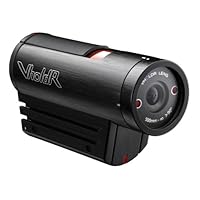 As a gadget geek, I have the pleasure of reviewing numerous fun and exciting gizmos, gadgets, and thing-a-majigs throughout the year. One that really caught my eye this year is the VholdR Wearable Camera made by the Seattle, WA start-up I told you about during CES in January.
 Well great news, they're now available on Amazon.com and make a great gift for the adventurous types on your list. A super-simple camera for even the most non-techie (slide to record, slide to stop) adventurer, the true beauty is in the easy-to-use software (which now, you'll be thrilled to know), is available for Mac users!
 For a video demo, check out this blog posting and pick one up at Amazon.com.
And when you do... I'd love to see the videos!
Online Holiday Shopping How-To: Essential Money-Saving Tips
It's no secret the hot holiday gadgets this year will be very similar to last year's list: Wii, Wii Fit, many of the Rock Band 2 / Guitar Hero / related accessory packs, automobile GPS navigation units, digital cameras and -- especially this year -- flat screen televisions. To get these must-have items, you're going to need to do a bit of cyber-sleuthing... try these tips:
First tip: Patience. Often persistence, patience and some good-'ole fashioned hard work will land that essential gift. Befriend a local store manager, call the local big box each morning, and shop online - often. There's no telling when a sold-out item will be in stock and as they say: "the early bird..." (you get the idea).
Don't be afraid to use technology to find technology. There are sites that scour the web for you - many will even notify you if an item becomes available at the price you're willing to pay. I used one, NowInStock.net last year to find Wii consoles for friends and family. (Note: the website appears to have turned off mobile notifications (via. Twitter) given improved stock in online retailers... this may, of course, change as the gift-giving season heats up.) Other e-tailers, such as Amazon.com, will have built-in notifiers. Sign up to be alerted and prepare to drop everything and BUY NOW! (Experts recommend having an account created and login information handy to minimize the purchase time.)
Finally, there are four tips EVERYONE should ALWAYS do before hitting the virtual check-out:
A) Shop around. Amazon.com might be convenient, but they don't always have the best price. Use price comparison sites such as pricegrabber.com or even Google itself to check average prices. Be sure to check total price, including shipping and any taxes / fees.
B) Use a rebate site (my favorite, and I've mentioned it on the show before, EBATES.com) or referral bonuses (check your airline website for air mile opportunities for example) for maximum return on your holiday dollar. Seriously, folks, don't buy before you first visit EBATES.com -- you're leaving money on the table.
C) Look for coupons & free-shipping offers. This one's easy: search for the name of the retailer +. For example, if I see the word "Bargain Saver Code" in an online checkout site, that's a clue to search the web for + "bargain saver code". Different retailers use different names for their discounts -- but the logic here is this: Instructions on how to use the code are frequently re-posted by others, or even the retailer itself. The key phrase is often something like this: "Go to supershoemonkey.com and enter Monkey-Saver Code: XYZ123." By searching for "Monkey-Saver Code supershoemonkey.com", you're looking for those deals. Try it. Thank me later. ;-)
D) Check the return policy and save your receipt. Especially in this economy, prices are subject to change. Learn your retailers return policy and price adjustment practices. And check back. Another retailers may offer a lower price (repurchase/return) while some may drastically reduce their own prices. Online retailers with physical stores near you may allow in-store returns (or price adjustments), but check policies carefully before you buy. I spent over $100 at Banana Republic this past weekend only to return the next day to find out they were offering an additional %10 and other savings -- I got a bonus tie with the extra savings!
Happy Holiday bargain hunting!
12/1 Update: Hear this story as broadcast on Newsradio 750 KXL (KXL.com) during our Cyber Monday coverage. Listen to the MP3 now.
First tip: Patience. Often persistence, patience and some good-'ole fashioned hard work will land that essential gift. Befriend a local store manager, call the local big box each morning, and shop online - often. There's no telling when a sold-out item will be in stock and as they say: "the early bird..." (you get the idea).
Don't be afraid to use technology to find technology. There are sites that scour the web for you - many will even notify you if an item becomes available at the price you're willing to pay. I used one, NowInStock.net last year to find Wii consoles for friends and family. (Note: the website appears to have turned off mobile notifications (via. Twitter) given improved stock in online retailers... this may, of course, change as the gift-giving season heats up.) Other e-tailers, such as Amazon.com, will have built-in notifiers. Sign up to be alerted and prepare to drop everything and BUY NOW! (Experts recommend having an account created and login information handy to minimize the purchase time.)
Finally, there are four tips EVERYONE should ALWAYS do before hitting the virtual check-out:
A) Shop around. Amazon.com might be convenient, but they don't always have the best price. Use price comparison sites such as pricegrabber.com or even Google itself to check average prices. Be sure to check total price, including shipping and any taxes / fees.
B) Use a rebate site (my favorite, and I've mentioned it on the show before, EBATES.com) or referral bonuses (check your airline website for air mile opportunities for example) for maximum return on your holiday dollar. Seriously, folks, don't buy before you first visit EBATES.com -- you're leaving money on the table.
C) Look for coupons & free-shipping offers. This one's easy: search for the name of the retailer +
D) Check the return policy and save your receipt. Especially in this economy, prices are subject to change. Learn your retailers return policy and price adjustment practices. And check back. Another retailers may offer a lower price (repurchase/return) while some may drastically reduce their own prices. Online retailers with physical stores near you may allow in-store returns (or price adjustments), but check policies carefully before you buy. I spent over $100 at Banana Republic this past weekend only to return the next day to find out they were offering an additional %10 and other savings -- I got a bonus tie with the extra savings!
Happy Holiday bargain hunting!
12/1 Update: Hear this story as broadcast on Newsradio 750 KXL (KXL.com) during our Cyber Monday coverage. Listen to the MP3 now.
Black Friday: Buying a TV? Comparison Chart
The folks over at 3Deals.com have put together a great comparison grid of all Black Friday TV deals... check it out! (Also a great baseline for spotting good deals with retailers in the weeks to come...)
Thursday, November 27, 2008
Gift Guide: Capturing Holiday Memories (KATU-TV)
Looking for the latest gadgets to capture holiday memories? Perhaps a gift idea for the memory master in your life? Check out these great digital photo and video gifts:
Nikon D90 Digital SLR – Digital SLR with live-view and HD video. The latest and greatest in the prosumer digital SLR line – those cameras with detachable lenses perfect for high-quality family photos – the D90 sports a live-action viewfinder so you can watch the action and a high-definition video recording mode. Three reasons you might opt for a DSLR over a simple point-and-shoot? 1) Flexibility / Lens options, 2) Lower-light photos, 3) Higher-quality photos. (Of course there are thousands more differences between Digital SLRs and point-and-shoots, but we’ll keep it simple for now.)
Grab yours on Amazon.com for $1150 including lens (I recommend the 18-200 lens upgrade for a few hundred bucks more).
Flip Mino HD – Flip video cameras revolutionized the video capture world. They made taking, editing, and sharing video clips of family and friends simple. Now the same folks took it to the next level by introducing a high-defintion camera: the Flip Mino HD. Capable of 60 minutes of high definition video before downloading, the Flip’s a perfect on-the-go high-quality pocket camera. More information here and you can order yours from Amazon.com here.
Intouch IT7150 Multimedia touchscreen – Far more than “last year’s” digital photo frame, the IT7150 is a complete multimedia entertainment viewer. It plays photo and video slideshows, music, browses the web, even plays your favorite internet-streaming radio stations (you can listen to me weekly on Newsradio 750 KXL!)… And if that’s not enough – it’s RSS technology let’s you stream content directly to the photo frame via. WiFi. Give this gift to the grandparents and update the photos they see automatically! (No word at press time on if this versatile device also “slices, dices, and makes pizza… “, though it wouldn’t surprise me!) Starting price: $349 at Amazon.com or other retailers.
Olympus 1050 SW – Northwest outdoor adventurers know operating a delicate digital camera in the snow is next to impossible. How about a waterproof digital camera that can be controlled by tapping the side? Tap once to replay photos, again to adjust flash settings, and then twice to confirm. It’s perfect for the slopes while wearing gloves. My favorite feature? (And a great party trick!) the Olympus 1050SW is completely waterproof! Sure, drop it in water… it’ll keep on shooting. Even takes photos in up to 10 feet of water. The ultimate beach camera. Amazon’s got ‘em for $240 (Silver, other colors available)
HP A636 portable photo printer – HP, a pioneer in printing, updates their portable photo printers with a take-it-with-you model capable of 5x7 prints. Bring it to your next holiday party and pass out prints as guests depart or save off photo-store prices. Toss in an optional HP battery and you’re printing photo memories anywhere! ($139, Amazon.com)
Epson Artisan 800 – The ultimate home printer: not only does this deluxe model serve up photo prints quickly, it scans, faxes, and prints on media such as DVDs and CDs. A great household printer and just as useful in the home office, the Artisan 800 serves as a great replacement for the separate devices cluttering the den (and the cables, power adapters, and accessories that go with them!). Buy now!
HP TouchSmart PC – Owners of the iPhone will agree that Touch is ONLY way to interface with electronics. Swipe, pinch, swoosh… the HP Touchsmart line of PCs makes this a bigscreen reality. Models available with BluRay high-definition video, HP’s touch-interface software and full multimedia capabilities. This machine is the perfect family computer for videos, music, photos and all your family memories. Upgrade your family computer here starting at $1200.
Nikon D90 Digital SLR – Digital SLR with live-view and HD video. The latest and greatest in the prosumer digital SLR line – those cameras with detachable lenses perfect for high-quality family photos – the D90 sports a live-action viewfinder so you can watch the action and a high-definition video recording mode. Three reasons you might opt for a DSLR over a simple point-and-shoot? 1) Flexibility / Lens options, 2) Lower-light photos, 3) Higher-quality photos. (Of course there are thousands more differences between Digital SLRs and point-and-shoots, but we’ll keep it simple for now.)
Grab yours on Amazon.com for $1150 including lens (I recommend the 18-200 lens upgrade for a few hundred bucks more).
Flip Mino HD – Flip video cameras revolutionized the video capture world. They made taking, editing, and sharing video clips of family and friends simple. Now the same folks took it to the next level by introducing a high-defintion camera: the Flip Mino HD. Capable of 60 minutes of high definition video before downloading, the Flip’s a perfect on-the-go high-quality pocket camera. More information here and you can order yours from Amazon.com here.
Intouch IT7150 Multimedia touchscreen – Far more than “last year’s” digital photo frame, the IT7150 is a complete multimedia entertainment viewer. It plays photo and video slideshows, music, browses the web, even plays your favorite internet-streaming radio stations (you can listen to me weekly on Newsradio 750 KXL!)… And if that’s not enough – it’s RSS technology let’s you stream content directly to the photo frame via. WiFi. Give this gift to the grandparents and update the photos they see automatically! (No word at press time on if this versatile device also “slices, dices, and makes pizza… “, though it wouldn’t surprise me!) Starting price: $349 at Amazon.com or other retailers.
Olympus 1050 SW – Northwest outdoor adventurers know operating a delicate digital camera in the snow is next to impossible. How about a waterproof digital camera that can be controlled by tapping the side? Tap once to replay photos, again to adjust flash settings, and then twice to confirm. It’s perfect for the slopes while wearing gloves. My favorite feature? (And a great party trick!) the Olympus 1050SW is completely waterproof! Sure, drop it in water… it’ll keep on shooting. Even takes photos in up to 10 feet of water. The ultimate beach camera. Amazon’s got ‘em for $240 (Silver, other colors available)
HP A636 portable photo printer – HP, a pioneer in printing, updates their portable photo printers with a take-it-with-you model capable of 5x7 prints. Bring it to your next holiday party and pass out prints as guests depart or save off photo-store prices. Toss in an optional HP battery and you’re printing photo memories anywhere! ($139, Amazon.com)
Epson Artisan 800 – The ultimate home printer: not only does this deluxe model serve up photo prints quickly, it scans, faxes, and prints on media such as DVDs and CDs. A great household printer and just as useful in the home office, the Artisan 800 serves as a great replacement for the separate devices cluttering the den (and the cables, power adapters, and accessories that go with them!). Buy now!
HP TouchSmart PC – Owners of the iPhone will agree that Touch is ONLY way to interface with electronics. Swipe, pinch, swoosh… the HP Touchsmart line of PCs makes this a bigscreen reality. Models available with BluRay high-definition video, HP’s touch-interface software and full multimedia capabilities. This machine is the perfect family computer for videos, music, photos and all your family memories. Upgrade your family computer here starting at $1200.
Friday, October 31, 2008
Haunted Homepages for Halloween
Looking for some scary sites for Halloween fun? Today on Newsradio 750 KXL we took to the web in search of haunted homepages. Check these out:
http://halloween.com-- general overview with great links and information.
http://halloweenmashup.com -- find local haunts, area events, activities and more on a map!
http://halloweengames101.com-- great party games, fun ideas for halloween parties and entertaining.
http://halloweenghoststories.com -- relive the legends and scary ghost stories.
http://halloween-ecards.com -- e-greeting cards to send to friends and family with Halloween themes.
And keeping kids safe is definitely priority #1 this Halloween, visit the following sites for tips:
http://allergizer.com / http://healthcentral.com / http://allergymoms.com -- all great sites for allergy-free alternative treats.
http://familywatchdog.us -- enter an address, get a list of predators in your area -- great places to avoid trick-or-treating.
http://halloween-safety.com -- good site with general-purpose Halloween safety tips. (including tips for pets)
http://halloween.com-- general overview with great links and information.
http://halloweenmashup.com -- find local haunts, area events, activities and more on a map!
http://halloweengames101.com-- great party games, fun ideas for halloween parties and entertaining.
http://halloweenghoststories.com -- relive the legends and scary ghost stories.
http://halloween-ecards.com -- e-greeting cards to send to friends and family with Halloween themes.
And keeping kids safe is definitely priority #1 this Halloween, visit the following sites for tips:
http://allergizer.com / http://healthcentral.com / http://allergymoms.com -- all great sites for allergy-free alternative treats.
http://familywatchdog.us -- enter an address, get a list of predators in your area -- great places to avoid trick-or-treating.
http://halloween-safety.com -- good site with general-purpose Halloween safety tips. (including tips for pets)
Friday, December 21, 2007
Energy Consumption: LCD vs. Plasma Flat Screen TVs
New gadgets this holiday season come a bump in your power bill. Seemingly minor differences in technology can cause large swings in power consumption. Power bills can range from an average of $33 to $233 a year (source)
First on the list are new high-definition televisions. It seems logical that a larger television consumes more power than a same-technology, yet smaller, set. What you may not know, however, is that the type of display makes a significant difference. Standard tube televisions and newer LCD panels consume only two-thirds the power of a new plasma screen.
Current generation video game consoles vary widely in the amount of electricity required as well. For instance, according to a CNET’s TV power consumption guide, a PlayStation 3 consumes 197 watts while the Xbox 360 is just under at 187 watts. Nintendo’s latest console, the popular Wii, wins the efficiency award, roughly one-tenth of it’s rivals, consume approximately 19 watts.
And for those who think you’re saving power when the unit is “off” and in power saver mode? Think again! Some units tested in CNET’s report consume as much as 10 watts when sitting idle.
There are steps you can take to reduce your energy consumption. Buy an energy-efficient set – look for ratings or ask your retailer. Various brands in the same size can have different power requirements. Consider completely shutting down your set when not watching programming.
Does this mean you shouldn’t upgrade? No.
Being an educated consumer when shopping for a replacement set will reduce your energy consumption and save you money on your power bill.
First on the list are new high-definition televisions. It seems logical that a larger television consumes more power than a same-technology, yet smaller, set. What you may not know, however, is that the type of display makes a significant difference. Standard tube televisions and newer LCD panels consume only two-thirds the power of a new plasma screen.
Current generation video game consoles vary widely in the amount of electricity required as well. For instance, according to a CNET’s TV power consumption guide, a PlayStation 3 consumes 197 watts while the Xbox 360 is just under at 187 watts. Nintendo’s latest console, the popular Wii, wins the efficiency award, roughly one-tenth of it’s rivals, consume approximately 19 watts.
And for those who think you’re saving power when the unit is “off” and in power saver mode? Think again! Some units tested in CNET’s report consume as much as 10 watts when sitting idle.
There are steps you can take to reduce your energy consumption. Buy an energy-efficient set – look for ratings or ask your retailer. Various brands in the same size can have different power requirements. Consider completely shutting down your set when not watching programming.
Does this mean you shouldn’t upgrade? No.
Being an educated consumer when shopping for a replacement set will reduce your energy consumption and save you money on your power bill.
Thursday, December 20, 2007
Update: Last Minute Wii-Finding Tips & Tricks
 Previously on Newsradio 750 KXL I gave listeners tips on how to find the sold-out Wii video game console. I've received dozens of emails from listeners and thought I'd post an update for those still searching for the video game device to put under the tree this Christmas.
 Here are some tips:
- Sign up for online Wii trackers: websites such as www.nowinstock.com/wii and www.wiitracker.com have convenient, centralized and constantly updated, listings of where to find a Wii. Sign up for alerts via. Twitter or email or refresh the site frequently. Wii consoles have been available at the online retailers in the past few days -- but check often as they are being snatched up within mere minutes.
- Get or give a raincheck: Some retailers are offering guarantees that you will be able to buy a Wii in January. And if the recipient can want (and really, they probably can, right?) -- why not offer to buy a Wii when stock shortages ease after the holidays?
- Go to Game Crazy on Christmas Eve: I'm being told by Tanya Khamis, Sr. Marketing Manager for Wilsonville-based Game Crazy, that 100 consoles will be available at their King City store. "Santa Claus and his elves will be hand delivering them." Free raffle tickets will be distributed giving winners the opportunity to purchase the sold-out console at retail price. Those who don't win a chance to purchase will be given a chance to win one of two free Wii's the game retailer is giving away!
Event details: Game Crazy - 15660 SW Pacific Hwy, Ste 100, Tigard, OR 97224 on December 24th. Tickets will be given out beginning at 7am, raffle drawing starts at 10am. (As an added bonus, those with a raffle ticket will be offered 10% off non-hardware purchases at Game Crazy all day December 24th!)
Keep it right here for more tips on how to score the holiday's hottest game console!
Tuesday, December 4, 2007
Google Helps NORAD Track Santa
As if search, maps, blogs, mail, talk among others weren't enough -- Google has its hands in the Santa Tracking business. The NORAD site has some fun games for the kids now, and according to the Google blog, a special website (noradsanta.org) will be a must-visit starting 1:00 AM PST on 24 December 2007.
Tracking santa has never been easier.
Tracking santa has never been easier.
Friday, November 23, 2007
Brian Westbrook's 2007 Holiday Gadget Guide
KXL Tech Expert Segment for 23 November 2007
Nespresso Lattissima
 For the coffee aficionado in your life – single-serve coffee machines provide a convenient way to serve up a cup o’ jo with push-button ease. Nespresso offers a line of machines ranging from simple entry-level to the deluxe “Top line” model. Now these kitchen gadgets work by placing a coded (where a darker color, cleverly = darker roast) capsule into the top, locking it into place and pressing a single button. My favorite, the Lattissima includes a milk frother (and who can’t love a gadget that comes with a “frother”) makes lattes and cappuccinos – it even cleans itself! The Lattissima is available for $700 or $800 depending on the options and you can buy it online here or check it out at fine kitchen stores such as Williams-Sonoma. If you’re a business owner looking for a gift for the break room, ask about Nespresso’s commercial line.
Sony’s DVD Direct VRD-MC5
Got a pile of old VHS tapes? We just moved and it killed me to lug around a carton of old tapes. One of the questions I get often from blog readers is how to convert old VHS, 8mm, and other old-school format tapes to DVD. Sony recently released a new device that I couldn’t wait to test drive -- it includes a small color viewfinder so you can see what’s going on and doesn’t require a computer. Not only does it transfer movies to DVD, but you can copy high definition videos from certain camcorders add backgrounds to DVD menus – it even includes the ability to transfer
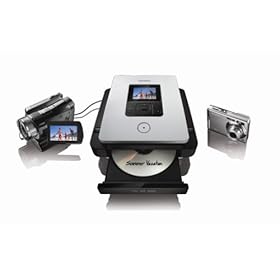 photos from your camera’s memory card onto inexpensive recordable discs … I can’t tell you how many times I’ve been on vacation and wish they had something like this in the hotel lobby! To use, connect up your VCR, camcorder or other video device to the Sony VRD-MC5 press record and watch your parents’ old home movies jump generations landing on DVD. The Sony DVD Direct gadget is available online for $200 or you can take it for your own test-drive at the SonyStyle Store (online) at Washington Square. I’ve been digging my way through the carton of tapes in my garage… and now I’ve got room for all sorts of new electronics.
Support this site, buy through this link: Amazon.com
Amazon’s Kindle E-book reader
For the book worm: At first glance it seems odd Amazon would offer a product that attempts to replace the print book… but the “Kindle” does just that. With wireless connectivity and access to 90,000 titles over high-speed cellular data connections – you can instantly access books, magazines, and newspapers on-demand. It’s $400 and available – you guessed it – on Amazon.com.
Fisher-Price Kid-Tough Camera
My niece loves watching me take photos with my digital camera. Unfortunately, equipping this preschooler with a $1500 digital SLR camera like my Nikon D200 – probably not a wise idea. Kid Expert Fisher Price comes to the rescue with a $60 option for the 3-7 year old set… available in blue or pink it takes up to 50 photos and has a dual-eye viewfinder designed for the little one. Plus, since it’s made by Fisher-Price – you know it’s built -- as they say “kid tough”.
Apple iPod Touch
For those on your list waiting until next year for the anticipated next-generation iPhone, give the gift of an iPod Touch. Sporting many features of it’s phone-calling and text-messaging big brother, the Touch has the same display, web browsing and multimedia playback features without contracts data plans or switching carriers. Pick one up at the Apple Store or online for about $300.
What gadgets are you excited about this holiday? Drop me a line if you have gadget-shopping questions or would like to know what to buy me. ;-)
Listen to Brian Westbrook's 2007 Holiday Gadget Guide originally broadcast on Newsradio 750 KXL (Friday 23 November 2007): kxl_techexpert-gadgetguide2007_20071123.mp3
Until next time ... happy shopping!
Nespresso Lattissima
For the coffee aficionado in your life – single-serve coffee machines provide a convenient way to serve up a cup o’ jo with push-button ease. Nespresso offers a line of machines ranging from simple entry-level to the deluxe “Top line” model. Now these kitchen gadgets work by placing a coded (where a darker color, cleverly = darker roast) capsule into the top, locking it into place and pressing a single button. My favorite, the Lattissima includes a milk frother (and who can’t love a gadget that comes with a “frother”) makes lattes and cappuccinos – it even cleans itself! The Lattissima is available for $700 or $800 depending on the options and you can buy it online here or check it out at fine kitchen stores such as Williams-Sonoma. If you’re a business owner looking for a gift for the break room, ask about Nespresso’s commercial line.Sony’s DVD Direct VRD-MC5
Got a pile of old VHS tapes? We just moved and it killed me to lug around a carton of old tapes. One of the questions I get often from blog readers is how to convert old VHS, 8mm, and other old-school format tapes to DVD. Sony recently released a new device that I couldn’t wait to test drive -- it includes a small color viewfinder so you can see what’s going on and doesn’t require a computer. Not only does it transfer movies to DVD, but you can copy high definition videos from certain camcorders add backgrounds to DVD menus – it even includes the ability to transfer
photos from your camera’s memory card onto inexpensive recordable discs … I can’t tell you how many times I’ve been on vacation and wish they had something like this in the hotel lobby! To use, connect up your VCR, camcorder or other video device to the Sony VRD-MC5 press record and watch your parents’ old home movies jump generations landing on DVD. The Sony DVD Direct gadget is available online for $200 or you can take it for your own test-drive at the SonyStyle Store (online) at Washington Square. I’ve been digging my way through the carton of tapes in my garage… and now I’ve got room for all sorts of new electronics.Support this site, buy through this link: Amazon.com
Amazon’s Kindle E-book reader
For the book worm: At first glance it seems odd Amazon would offer a product that attempts to replace the print book… but the “Kindle” does just that. With wireless connectivity and access to 90,000 titles over high-speed cellular data connections – you can instantly access books, magazines, and newspapers on-demand. It’s $400 and available – you guessed it – on Amazon.com.
Fisher-Price Kid-Tough Camera
My niece loves watching me take photos with my digital camera. Unfortunately, equipping this preschooler with a $1500 digital SLR camera like my Nikon D200 – probably not a wise idea. Kid Expert Fisher Price comes to the rescue with a $60 option for the 3-7 year old set… available in blue or pink it takes up to 50 photos and has a dual-eye viewfinder designed for the little one. Plus, since it’s made by Fisher-Price – you know it’s built -- as they say “kid tough”.
Apple iPod Touch
For those on your list waiting until next year for the anticipated next-generation iPhone, give the gift of an iPod Touch. Sporting many features of it’s phone-calling and text-messaging big brother, the Touch has the same display, web browsing and multimedia playback features without contracts data plans or switching carriers. Pick one up at the Apple Store or online for about $300.
What gadgets are you excited about this holiday? Drop me a line if you have gadget-shopping questions or would like to know what to buy me. ;-)
Listen to Brian Westbrook's 2007 Holiday Gadget Guide originally broadcast on Newsradio 750 KXL (Friday 23 November 2007): kxl_techexpert-gadgetguide2007_20071123.mp3
Until next time ... happy shopping!
Subscribe to:
Posts (Atom)