Showing posts with label gadgets. Show all posts

Friday, August 23, 2013

Schlage Touchscreen Deadbolt: Strong lock for NW lifestyles

For the active Northwest family, keeping your home secure while constantly heading out to enjoy the outdoors can become problematic quickly.

Schlage Touchscreen Deadbolt
Enter the Schlage Touchscreen Deadbolt. Its sleek pad comes to life with a quick tap. This convenient security device contains the convenience of a touchscreen with the strength and confidence of Schlage, a brand known for security.

After the fine folks at Schlage graciously sent me a device for my own home, I was excited to replace our standard builder-provided, generic, deadbolt with this connected solution.

The installation process was relatively straightforward, even for the novice DIY’er. I hate to admit that I did consult the instructions a few times, but someone experienced with installing locks and deadbolts could likely leave the surprisingly easy-to-read instructions in the package. I had mine installed in less than 25 minutes. I suspect if you’re installing more than one (say, on a back door or side access area), you could have a few minutes off subsequent installs.

You won’t, however, want to ignore the directions when it comes to programming the Schlage Touchscreen Deadbolt. With capabilities such as holding up to 30 programmable codes, it’s perfect for guests, housekeepers and neighbors that need temporary access.
Given our front door is on the first level, I’ve assigned custom codes to various friends and family members to save myself a trip downstairs to let them in. (Sure, call me lazy- but technology is supposed to make our lives easier? :-) )

In addition to the custom codes – that can be easily tracked – the lock has sensitivity-adjustable alarms. The alert can act as a deterrent for break-ins making me feel secure that my home is protected – and ensure my friends won’t be left banging on my door for too long if they come for a surprise visit.

Within about a week I was adding and removing codes without consulting the directions—but the power of this smart home security device was really taken to the next level with its z-wave compatibility.


Nexia Bridge
As if the lock isn’t loaded enough with features for you, the Touchscreen Deadbolt connects to your home automation system like Nexia Home Intelligence. By using the Nexia Bridge, your Nexia system’s workhorse, you can access your lock via an internet-connected device. Unlock your front door with your phone or Ipad, program codes remotely, keep track of who has entered your house and when, and receive text alerts about alarm triggers or activation—all from a simple and intuitive interface.

While the power of the Schlage Touchscreen Deadbolt was further maximized with the addition of the Nexia Bridge, for many households the smart, strong lock will provide convenience all by itself. Imagine a world without remembering or losing your house keys!

Find yours in a variety of custom finishes and two distinct styles and a variety of finishes to match your décor at Amazon.com, HomeDepot.com, Lowes.com, or other hardware stores for around $199. (The optional Nexia Bridge is available from the same sources under $100 with a reasonable $9/month subscription price.)



Friday, August 19, 2011

KGW-TV's Live @ 7: Back To School Gadgets - 19 August 2011 (KGW-TV)


Shopping for Back to School? Check out these picks for a gadget-enhanced education:

HP Pavilion G6— An ideal PC-based laptop for those heading off for college that won’t bust the bank. Improved cooling, a biometric swipe for sign-on, and an HD webcam for keeping in touch with family back home. The brilliant 15.6” LED screen and optional Blu-ray player make it perfect for winding down after a long week of studying. ($600, hp.com)

HP Wi-Fi Mobile Mouse—The first mouse that connects using Wi-Fi to your PC, the innovative mouse contours to your hand and has multiple controls to easily navigate the web. ($49, hp.com)

Kobo eReader Touch—the well-designed touch-screen Kobo sports a lightweight design and using E Ink technology to provide an easy-to-read display. Available in four colors, this lightest-weight eBook reader supports a variety of open standard bookstore formats. ($130, kobobooks.com)

Amazon Kindle—the standard-bearer of the eBook revoluation, the Kindle continues to dominate e-reading. New this year, the Kindle store offers textbook rentals of any length from 30 to 360 days which can be read on your Kindle or any of a variety of phone/computer platforms. ($114, amazon.com)

HP Envy 100—The sleek and compact wireless Envy 100 won’t wake your roommate and supports AirPrint and an easy-to-use print-by-email feature. This printer has memory card slots for photo printing and a scanner to make digital copies of class notes and handouts. ($200, hp.com)

Grace Digital Audio Microsystem—The perfect bookshelf system for background music while studying or cranking the tunes to let loose after finals. Get content from various sources via. the buit-in WiFi connection, load songs from your USB device or connect any portable music player. With five alarm settings, it’ll also wake you up! ($250, GraceDigitalAudio.com)

GriffinTech TechSafe Cable Lock System—Keep your laptop secure… lock it up. Look for an optional Anchor Clamp that turns any table into a secure place to lock down your laptop. ($30, griffintechnology.com)

PowerSkin Battery Pack—with hours between chargers, you can’t afford to be without juice for your smartphone. The PowerSkin battery pack is a case that doubles as a battery pack keeping you in touch with friends and family. ($50-80, power-skin.com)

RageGage: RageGage Smash Pad— a stress-reliever button that contains fun and cheeky expressions to blow off steam during late-night study sessions. A perfect gift for those students heading back to class—sure beats taking your frustration out on the dorm walls. Save the damage deposit and pick up the $20 Smash Pad instead! ($20, ragegage.com)

Grace Digital Audio Microsystem—The perfect bookshelf system for background music while studying or cranking the tunes to let loose after finals. Get content from various sources via. the buit-in WiFi connection, load songs from your USB device or connect any portable music player. With five alarm settings, it’ll also wake you up! ($250, GraceDigitalAudio.com)


Wednesday, August 10, 2011

KING-TV's New Day Northwest w/Margaret Larson: Back To School Gadgets - 10 August 2011 (KING-TV)


Once upon a time, we sharpened our pencils and bought notebook paper to go back to school, but times have changed. Now, there are more gadgets and gizmos than we can count... but how do you know you're buying the right ones for your kids whether they're headed off to middle or high school, or college? Tech expert Brian M. Westbrook shows a bunch of high tech gadgets for Back To School... including:

Kobo eReader Touch— The well-designed touch-screen Kobu sports a lightwveight design and using E Ink technology to provide an easy-to-read display. Available in four colors, this lightest-weight eBook reader supports a variety of open standard bookstore formats. ($130, kobobooks.com)

Amazon's Kindle— The standard-bearer of the eBook revoluation, the Kindle continues to dominate e-reading. New this year, the Kindle store offers textbook rentals of any length from 30 to 360 days which can be read on your Kindle or any of a variety of phone/computer platforms. ($114, amazon.com)

Epson Stylus NX625— All-in-one printer that has build-in WiFi and prints from mobile devices (including the Apple iPhone). Sporting a 2.5-inch color LCD and built-in memory card slots, you'll be printing those reports and homework in brilliant quality. ($130, epson.com)

HP Pavillion G6— An ideal PC-based laptop for those heading off for college that won't bust the bank. Improved cooling, a biometric swipe for sign-on, and an HD webcam for keeping in touch with family back home. The brilliant 15.6" LED screen and optional Blu-ray player make it perfect for winding down after a long week of studying. ($600, hp.com)

HP Wi-Fi Mobile Mouse— The first mouse that connects using Wi-Fi to your PC, the innovative mouse contours to your hand and has multiple controls to easily navigate the web. ($49, hp.com)

Verbatim: Store 'n' Go® Clip-It USB Drive— These tiny USB thumb drives are perfect problem-solvers for transferring photos, projects, or notes back and forth between machines or as a backup. Starting at $23, they're cheap insurance for students of all ages. ($23-60, verbatim.com)

RageGage: RageGage Smash Pad— a stress-reliever button that contains fun and cheeky expressions to blow off steam during late-night study sessions. A perfect gift for those students heading back to class—sure beats taking your frustration out on the dorm walls. Save the damage deposit and pick up the $20 Smash Pad instead! ($20, ragegage.com)

And finally, a handy organizer for your tablet from cocoonbags.com!

For more visit http://tech.brianwestbrook.com or follow Brian on Twitter: http://twitter.com/BMW/

Tuesday, October 26, 2010

KING-TV's "New Day Northwest" w/Margaret Larson: TV Tech - 26 October 2010 (KING-TV)


Logitech Harmony programmable remote controls ($50-250)
http://www.logitech.com/en-us/remotes/universal-remotes
Dump the multiple remote controls for receivers, televisions, entertainment devices and simplify your life with one easy-to-use Logitech Harmony remote control. Easily programmable on your computer, these marriage-saving gadgets make using the various functions as easy as pressing the cleverly-named “Watch TV” button.


Slingbox ($180-300)
http://www.slingbox.com/
Take your television programming with you anywhere you are! Watch your home TV, live, over the Internet using software on your laptop or smartphone at the office or while on vacation. Imagine letting your kids watch the same television back home in the backseat of the car! Use with the free computer software or pick up a handy Sling Player app for your mobile device.


SlingPlayer Mobile ($30)
http://www.slingbox.com
Used in conjunction with a standalone Slingbox, or with a compatible satellite receiver from DISH Network, the SlingPlayer Mobile takes your TV viewing experience on-the-go! Android, iPhone/iPod Touch, Blackberry and more phones are $30 each, a high-definition iPad version is “Coming Soon”.


Google TV / Logitech Revue ($179+)
http://www.dishnetwork.com/GoogleTV/
This companion box to your DISH Networks receiver adds the web into your TV viewing mix. Look up information while watching TV, browse the latest in web videos, run apps designed to enhance your home entertainment experience, or listen to streaming radio—all using your television. It’s been tried before, but Google TV finally gets it right. Look for further convergence of the TV and Internet in the coming year.


DISH Network VIP 922 Slingloaded DVR
http://www.dishnetwork.com/receivers/vip922/customer.aspx
Everyone needs a DVR! The ability to pause live TV, record shows when you want, and –dare I say—skip commercials… if you’re not watching TV with a digital video recorder, this one has it all. It comes “Slingloaded” so you can watch your TV anywhere using the Slingplayer software on your computer or smartphone, but also has dual-tuner capability and the largest built-in hard drive available!


Apple TV ($99)
http://www.apple.com/appletv/
Forget trips to the video store—Apple TV brings HD movies and TV shows to your television via. the Internet. Watch Netflix, stream video clips from your local network, and “rent” movies and commercial-free TV shows for under a dollar an episode. This super-slick and tiny second-generation Apple TV requires an HDMI port on your television and connect via. WiFi or Ethernet cable to your network.


Westinghouse 32" TV ($350)
http://westinghousedigital.com/products/led/32-40/ld325/
Great content requires a great television! The Westinghouse LED TVs have a brilliant display, energy-efficient LED technology (as opposed to LCD), and won’t bust the bank. When looking for a television, look for features such as number of inputs, consumer reviews, and manufacturer warranty.

Any tips for others on how YOU watch TV? What devices are an essential part of your home entertainment system?

Wednesday, September 15, 2010

Video: Parallels Mobile-- Windows apps on your iPad?

A friend of mine created and passed along this video... (apparently it was 'last night from a hotel room-- whatever dude, it looks great). I'm a VMWare Fusion user myself, but I gotta say-- this video makes the Parallels argument pretty compelling. I'll give it a whirl, but in the meantime, watch:


Looks like the guys over at Parallels found a way to separate themselves from the competition. Seems an easy way to run Windows apps on a Mac you're away from. Sure, sure, there are inherent limits-- but for many this is a brilliant solution. Get it at iTunes store for iPhone and iPad.

Let me know what you think?

Friday, August 6, 2010

KXL: Back-To-School Tech Guide 2010 Edition

In less than a month students will be heading back to class, and with them... the latest tech gadgets.

Let's start with some fun gadgets I've found for this year's back-to-school shopping:

Neverlate 7-day Alarm Clock ($35, ThinkGeek.com)
Set each day's wake-up alarm based on your class schedule. Set the snooze time from 1-30 minutes and up to 7 independent daily alarms. The 5" cube has a battery backup and even has a "nap" timer. Brilliant!

USB Memory Watch ($20-$40, ThinkGeek.com)
It's a watch! It's a USB memory stick! This handy combo-accessory comes in 2GB, 4GB and 8GB versions and is even shock proof and anti-static.

LightWedge Reading Light ($20-$25, ThinkGeek.com)
An ideal accessory for late-night studying, it wedges between the pages and illuminates the entire page. Available in paperpack and textbook sizes, the LightWedge Reading LIght runs on 4 AAA batteries for up to 40 hours of light.

Speaking of reading... what about the e-book readers? A good idea for students or a waste of money?

It all depends on your situation. Think about what titles are available for a specific platform of e-book readers, and consider the pros/cons of lightweight travel vs. not being able to highlight in the books or, potentially, sell used titles back at the end of the semester. Do the math, often the pricing is only slightly cheaper for electronic titles. That said, e-book readers such as the Amazon Kindle have dropped in price dramatically and may be the perfect back-to-school accessory.

Many listeners ask about which computer they should buy. I hear often: netbook vs. notebook... and Mac vs. PC. Here are a pair to consider, one of each (I happen to use both regularly):

HP Mini 210 in Preppy Pink ($300+, Amazon.com)
Ultra-portable netbook from HP slides from class-to-class with lightweight ease. Available in six colors including "preppy pink" he netbook boasts battery life that leaves its bigger brother laptops in the dust. The 93% keyboard takes some getting used to, but the portability will more than make up for it. Not the best bet for those seeking degrees in graphics design, programming, or other technical fields.

Apple Macbook Pro 15" ($1800+, http://www.apple.com/store)
Graphics and creative students may opt for a Mac OS X-based Macbook. Starting at $1000 for the basic Macbook and two hundred bucks more for the Pro series, Apple notebooks are well-designed robust systems. Add Parallels, Fusion or Apple's own bootcamp for full Windows support.

If you have other questions about gadgets and tech for back-to-school, leave them in the comments or email: techexpert AT brianwestbrook DOT com

Friday, June 18, 2010

KGW-TV's "The Square" Live @ 7: Bike Tech - 18June2010 (KGW-TV)

(Originally broadcast on KGW-TV's "The Square Live @ 7" on 18 June 2010)

Gyro Bike kids bike wheel:

12”/16” Kids Gyrowheel ($115-155)
TheGyroBike.com

Dump the rickety training wheels and teach your kid to ride with the latest in high-tech biking for kids. With three levels of gyro-stabilization, this replacement front wheel helps kids learn balance in safe and staged approach. Available now in 12 and 16 inch versions and powered by rechargeable batteries. http://www.thegyrobike.com or check out their Youtube channel with lots of fun clips at http://youtube.com/gyrobike ($115 – 12” wheel, $155 – 16” wheel available soon)


Garmin Cycling GPS:

Garmin Edge 500 Cycling Computer ($250)
garmin.com

Perfect for serious cyclists in the Northwest terrain, a mere 2 hour mini-computer clips on to your handle bar to give instand access to current stats. Quick mount is secure, yet easily removable and when you’re done—link it up to Garmin Connect for a peak at your ride and a map of your route. I’ve seen a few of these reports from my cycling buddies on Facebook, and nothing brags about your 50+ mile bike ride like documentation! (GPS-enabled super cycle computer displays power data from ANT +™-enabled third-party power meters, barometric altitude and vertical profile, tracks speed, distance, calories burned, average and max speeds)


Garmin Forerunner 110 ($25)
garmin.com

Another option for those wanting to track their cycling journeys, especially if they’re also a runner—the Garmin Frontrunner 110 gives access to “just the facts”: distance and speed. But the slim watch-like monitor still has access to the super-cool Garmin Connect website to download, evaluate, and boast your ride, run or athletic activity. Plus, it tells the time!


Garmin Forerunner 310XT ($350)
Garmin.com


Combining the best features of the Forerunner 110 and the Edge 500, the Forerunner 310XT does it all—and it’s waterproof. Designed for triathletes, or the Portland weather, the 310XT goes from bike to bracelet in seconds. Giving you access to the essential information via. a wireless ANT+ link to your computer—you’ll have instant access to the hard work you put into your ride in no time. (GPS-enabled personal trainer heart rate-based calorie computation, automatic sync, multisport, high-sensitivity receiver, courses feature, advanced workouts, rechargeable lithium-ion battery)


PrincetonTec Bike Lighting:


EOs Bike ($50)
princetontec.com


The EOs BIKE is light enough to throw into your jersey pocket for a late afternoon ride ensuring you’ll have enough light to get home Its use of high-grade materials ensures durability and strong resistance to water/weather and impact Includes helmet and handle bar attachments and headband. Self-contained and rechargeable. http://www.princetontec.com/?q=node/110


Swerve Tail light ($30)
princetontec.com


With two high-powered LEDs, the Swerve creates a 180-degree beam. Flip the switch to go from flash pattern to steady light. The high-tech tail light also mounts on a handle bar, seat pos and includes seat and fork mounts. It also clips on to your pack or messenger bag. http://www.princetontec.com/?q=node/124 ($30)


YUBZ Bluetooth Speakerphone ($150)

yubz.com


A hands-free speakerphone for your bike! 10 hours on 4x AA batteries and an optional bike mount. Listen to tunes while you ride or take a call at a stop sign.


Sanyo eneloop electric-assist bike ($2300)
us.sanyo.com


The SANYO Synergetic Hybrid Bicycle is a next generation bicycle that transports you efficiently with minimal effort. The SANYO Synergetic Hybrid Bicycle features innovative functions such as "loop charging," which charges the battery while riding. "Two-wheel drive" allows for smooth start-up on hills and slopes and ensures a steady, stable ride. For the truly lazy rider, like me! ($2300+)

Tuesday, June 8, 2010

DirecTV Software Update Causes HD DVR Outage

Earlier this morning the KXL newsroom received a tip from an, understandably, frustrated listener who couldn't get through to DirecTV support... seems the caller's DirecTV HD DVR had locked up and they were unable to change the channel.

Some surfing of the Internet this morning helped me discover the problem was, apparently, a software update overnight blast to the receivers that didn't quite work as planned for some customers.

DirecTV has since responded using their own Twitter account with this simple advice:

HDDVR customers: If your HDDVR will NOT power on, unplug the unit from the wall, wait 15sec, then replug, & repeat 1x to restore service.


(If you have a DirecTV DVR and can verify this worked for you, please comment below.)

Using the above software glitch as a case-study, there are some things you might try before any service call:
  • First off, don't panic. Often you can make matters MUCH worse... we've all torn apart the home entertainment system or ripped apart our computer to discover it was a cable that fell out of the wall, or another simple fix. Take a deep breath, relax, analyze the problem systematically and don't add to your problems.
  • Power cycle everything. Sure, your monitor might appear to be working just fine and your lamp doesn't *appear* to be having troubles, but sometimes it's best to take a few extra seconds to disconnect power (unplug it from the wall socket or power strip completely) from the electronic gizmo causing grief, wait 30 seconds, and plug it back in.
  • Check for loose cables.
  • Are others having the same issue? (Ask around your office, check online (do a Twitter search), call a buddy)
  • Gather the necessary information before calling tech support (account numbers, serial numbers, exact description of the problem, what you've tried previously)
  • Be patient. They may walk you through the exact same things you've already tried-- but remember they're trying to help. It will take a few extra minutes, but best to try again and be confident.
  • Disclaimer: The above tips are general suggestions only and not meant to replace your hard-working IT staff and the manufacturer's own recommendations. Actual mileage may vary


And now, just in time for World Cup Soccer, your DVR is back up and running! Right?

For more on this and other tech stories, tune to Newsradio 750 KXL (750 AM in Portland, OR and online at KXL.com) each Friday morning at 6:20am & 8:20am.

Thursday, June 3, 2010

KING5's New Day Northwest: Going Handfree Guide 3June2010 (KING-TV)

On June 10, Washington State will start enforcing driving while holding a mobile telephone as a PRIMARY offense. Previously you could be cited, but only if pulled over for another offense (speeding, burnt out tail light, etc.). The new law aims to reduce distracted-driving crashing...

Obviously the BEST solution is to talk when you're done driving... But if you need to stay connected while on the road, there are some technology solutions to make it safer.

Pairing your device via. Bluetooth is actually quite easy... most phones offer on-screen menus, and many manufacturers are offering step-by-step guides to make it simple. Of course your phone carrier's store is a good place to go if you need help (or to try on devices).

Devices are either handsfree headsets or in-car / portable wireless speakerphones. Of course sometimes the simplest solution is the wired headset your phone came with.... nothing to charge!

Some ideas....

(Originally broadcast on KING-TV's "New Day Northwest" with Margaret Larson on 3 June 20100)

BLUETOOTH HEADSETS:

Plantronics Discovery 975
$130, plantronics.com
  • Minimalist design, one-touch controls
  • Small charging case for triple talk-time
  • Sleek elegant design, great call quality

Plantronics Voyager Pro UC
$100-200, plantronics.com
  • Dual-purpose mobile phone and computer headset
  • Perfect for office / home-office and on-the-go
  • Clear wideband audio for crisp call quality and audio
  • Sturdy over-the-ear attachment

Jabra Go 6430
$150, buyjabra.com
    Long-range wireless (good for around-the-house use)
  • Useful with mobile phone and computers (video chat, etc.)
  • Switch between a computer and mobile phone easily
  • Comes with travel charger and bluetooth adapter for older computers

Jabra Stone
$130, buyjabra.com
  • Wraps around your ear, not on your face
  • More comfortable to carry
  • Easy to transport, toss in your bag / purse
  • Designed for right ear-wearing only

Jawbone Icon w/NoiseAssassin
$75, jawbone.com
  • Stylish, small headset available in six colors
  • Tank & helicopter technology provides noise-cancelling
  • Talks back to you (recharge me, incoming call, etc.)
  • Fun names such as "The Ace", "The Thinker", "The Bombshell"

Plantronics Explorer 395
$50, plantronics.com
  • Latest technology, easy to use with comfortable fit
  • Simple design with volume, power, call answer/end buttons
  • Affordable, solid quality headset for average users

SPEAKERPHONES
Built-in Vehicle Solutions
$200+
  • Most new car vendors now offering Bluetooth speakerphone options
  • Cost varies, can be a few hundred with new cars, thousands to "retrofit"
  • Often has best call-quality- designed with car in mind
  • Integrates with car stereo, speakers, in-dash display
  • Some phones are more / less compatible, check with dealer

BlueAnt S4 Wireless Speakerphone
$100, blueantwireless.com
  • Voice-activated wireless speakerphone (speak "BlueAnt Speak To Me")
  • Clips to visor (no installation costs)
    • Incoming text messages are read using Vlingo SafeReader
    • Bing-optimized (movie times, stock quotes, weather, and more)

    Scochse: solCHAT Solar Speakerphone
    $100, scosche.com
    • Announces calls as they come in for hands-free driving
    • Features a simple three button design and automatic, user-friendly cell phone pairing
    • Comes with a USB charging cable and car adapter charging at night and on SEATTLE days
    • Includes a windshield suction cup mount and sun visor clip for easy operation and solar charging


    If you have questions, or need more information... hit me up on Twitter: @BMW or send me an email (listed above).

    Thanks for watching!
  • Monday, January 18, 2010

    The Square Live at 7 - Tech Box: CES 2010 Gadgets 18Jan2010 (KGW-TV)


    Sony Bloggie MP4 1080p 360degree camera Sony debuted this Flip-wannabe at CES, but not without adding useful features. Swivel head for recording your own clips, and a bundled attachment for 360-degree video after software processing. The camera uses USB to transfer videos and charge. (Buy: Amazon | SonyStyle)

    Samsung TL225 Dual-view camera Taking self-portraits has never been easier. This digital point-and-shoot sets itself apart from the rest by offering a screen on the front. Tap the camera and a forward-facing screen lights up to get the perfect shot of you and your friends! No more guesswork. (Buy: Amazon)

    Casio EX-G1 rugged digital camera It’s waterproof and shock-resistant. The Casio G1 takes all the benefits of the Exilim series and goes underwater! The ultimate cruise or beach camera it’s also quite slim, unlike many waterproof models. (Buy: Amazon)

    Verbatim Insight Hard drive Want to know how much space you’ve got left? The integrated two-line display will title this portable drive and show you how much space you’ve got to backup your photos, videos, and other files. (Buy: Amazon)


    Verbatim Tuff N Tiny memory stick Barely larger than your thumbnail and up to 8GB capacity. Built to resist dirt, water, and other elements. (Buy: Amazon)


    PogoPlug at-home network attached storage Plugs into your home network, then attach any USB hard drive or flash memory stick and access those files securely from anywhere in the world. (Buy: Amazon)


    Sprint Overdrive 3G/4G portable hotspot battery powered WiFi router now offers 4G speeds. Home-connection speeds from a go-anywhere device! (Buy: Amazon)

    Google Nexus One Android 2.1 mobile phone $179 with T-Mobile service, $530 without. “THE” Android phone to own, it sports the latest version of Google open-source Android operating system complete with real turn-by-turn navigation. Favorite feature? “Car mode” for driving. (Buy: Google)

    BlueAnt headset One of the first handsets to offer downloadable firmware, when the headset technology improves, you don’t need to buy a new one. (Buy: Amazon)

    Plantronics 975 This handsfree headset comes with a battery-pack case. Slide the comfortable noise-cancelling headset into it’s cradle and it’ll top up the juice so you can talk longer. (Buy: Amazon)

    Thursday, December 24, 2009

    Christmas Survival Guide: Kid Sites & Tech Support Tips

    With Christmas morning mere hours away, there's two things on your mind: Keeping the kids occupied while you cook dinner, and figuring out that fancy new gadget gift.

    I'm here to help!

    First, with some kid-friendly websites:

    Nickelodeon -- My own niece & nephew showed me this one... an assortment of educational, but fun, games will keep them occupied with characters they recognize and age-appropriate skill development.
    Crayola -- As one might expect from the crayon-and-crafts maker, lots of activities and exercises to download and print. Great for the "road trip activity" resources.
    Fisher-Price -- Proof it's never too young to get your child computing, the younger set will enjoy FP's simple colors and easy-to-manage colors, shapes and basic skills games. Enough fun the adults will want a turn!
    PBS Kids -- One of the better kid-friendly sites, look for extensions of television programming they may already be used to with learning and activities in a variety of areas.

    There are literally THOUSANDS more. Before setting your kid loose on any website, give them some guidance:

    • Know where they're going
    • Check out the websites in advance
    • Keep a watchful eye


    If you're receiving a new Blu-Ray player, computer, or other gadget this holiday... it might be overwhelming. It doesn't have to be.

    Some general tips to keep you from total frustration:
    • Take it easy. It's natural to want instant-gratification-- but take your time. Missing a set in setting up electronics can result in disappointment and frustration. Take the time to follow the instructions, complete the setup and learn how to work the device. It will save you headache and fatigue later on.
    • Don't return electronics to the store if they're "not working". There's a decent chance your gadget is not defective, rather you were just not properly trained in how to use it. (Blame the manual, not the user!) Call for tech support, ask someone else to take a look, or set it aside for a few hours and get a fresh look.
    • Take advantage of warranty support-- you might even have warranty support from the buyer's credit card. This is also a good time to mention extended warranties. Actual needs vary by owner, but generally I discourage buying extended service plans. (There's a reason they are sold aggressively.) A notable exception and a must-buy: AppleCare.
    • Tell your insurance company. Often your Home Owner or Renter's policies will cover new, often expensive, gadgets-- but only if they have logged serial number and purchase (or gift receipt) dates. This is especially relevant for high-end digital cameras, computers, and in-car electronics.


    Still frustrated? Need some help? I'll be monitoring this blog on Christmas Day-- feel free to ask your question here and I'll do my best to point you in the right direction!

    Merry Christmas!

    Thursday, December 17, 2009

    Holiday Gadget Gift Ideas on The Lars Larson Show

    Today I jumped on The Lars Larson Show (nationwide) to chat tech gift ideas. Lars and I have known each other for nearly 10 years and it's always great talking gadgets and gizmos with him both on and off-air.


    Listen (MP3) for yourself. We talk HP's DreamScreen, Joby Gorillapod, SPOT Personal Messenger, and more.... What gadgets are you giving (or hoping to get) this year?

    Happy Gadget-giving!

    Friday, August 21, 2009

    Back to School Tech on KGW-TV's The Square "Live at 7"


    click above to watch the broadcast as originally shown on KGW.com

    It's time to send the rugrats back to school and young adults everywhere are leaving the nest and moving to campus. I recently took time away from Gnomedex 9 to jump on KGW's The Square "Live @ 7" to share some back to school tech tips.

    First up, gadgets!

    LiveScribe Digital Pen ($150+) – Amazon. Take notes with a digital pen, record voice annotations, and search the text you wrote and save for later. It's high-tech paper and pen!

    Texas Instruments TI-89 Graphing Calculator ($140) – Amazon. The latest in graphing calculators from TI, the TI-89 is a must-have for back-to-school math. Plugs into your USB and even runs apps!

    Griffin AirCurve Acoustic Amp for iPhone ($20) It's an amplifier without wires, cables, or batteries. Using acoustic molding and a clever tunnel of sound, the Aircurve jumps your volume up 10db. Perfect for iPhone!

    Speck Products Laptop Backpack ($100) Use code "BMW25" for 25% all Speck Products. Get a stylish laptop bag that protects your new notebook!

    Back-To-School Tips:

    Computer essentials:
    • Focus on RAM, screen, keyboard
    • Battery Life critical
    • Storage doesn’t matter, but…
    • Portability does


    Mac vs. PC?
    • Personal preference
    • Coursework may determine
    • windows 7 Coming soon


    Tech dorm essentials
    • Plenty of spares!
    • Ink cartridges
    • Media
    • Extra power supply, batteries, etc.
    • Extra cables
    • Backup plans


    Helpful Back-to-School Websites:

    http://www.chegg.com – rent textbooks like netflix, save money!

    http://evernote.com -- capture notes, comments, clips on your phone or web

    http://www.curriki.org -- Curriculum Wiki, perfect for educators and parents to help students


    Thursday, July 30, 2009

    Nikon Adds DSLRs with Video: D300s, D3000 & Lenses

    For those keeping track at home, my primary digital SLR is a Nikon D300 with 18-200mm VR zoom lens. Now, it seems, Nikon -- in a fashion only seconded by Apple, Inc. -- has released new ways to take my money.

    Today they announced two digital SLR bodies: The D300s and a consumer-targeted D3000. Sounds like the upgraded D300s will add video-- something we've seen in both the top (D3) and mid-range (D90, D5000) of the lineup.

    I first was skeptical of adding video capability to a perfectly-good digital SLR, but now after time with the D90 and D5000, I can see the value, convenience of merging the two functions. Sure there are plenty of better video capture devices (even a Flip-sized handheld camera may suffice), but the convenience of using your existing lens glass (think zoom) is handy at times. To say nothing of not having to cart around a second device (and, more significantly, the batteries, chargers, and memory cards that accompany). Video (often HD video) in a digital SLR is at the very least something to strongly consider.

    While I strongly recommend the 18-200 VR lens-- with any Nikon camera, I'm not sure the upgrade to VRII justifies the expense to have the latest. Look for the original 18-200 VR lens and save yourself a few bucks if you can. I'll look forward to testing each.

    And speaking of new lenses, Nikon also tells us they're releasing a new 70-200mm 2.8 VRII. THAT, my friends, tops my wishlist. With Christmas right around the corner, I'm already getting ideas...

    Happy shooting! Let me know what you think of Nikon's announcements, which I've conveniently pasted here for your review:

    Nikon has just announced the highly anticipated professional level D300s and consumer level D3000 digital SLR cameras which deliver a new benchmark for creative freedom. Both cameras balance performance and versatility which make it easy to take great photos regardless of experience.


    Highlights of the D300s include:

    · 12.3-megapixel DX-format CMOS Image Sensor

    · D-Movie HD Video with external stereo microphone jack

    · Continuous shooting as fast as 7 frames-per-second

    · Available August 2009 for $1799.95 (body only)


    Highlights of the D3000 include:

    · New Nikon Guide Mode teaches and builds confidence in SLR photography

    · 10.2-Megapixel DX-format Imaging Sensor

    · 6 Automatic Exposure Scene Modes

    · Available August 2009 for $599.95 (camera outfit with 18-55mm VR lens)


    Nikon has also launched the new 18-200mm VR and 70-200mm VR lenses today. Both of these lenses use Nikon’s VR II image stabilization technology, to substantially reduce camera shake-related image blur. The 18-200mm VR lens will be available in September 2009 for $849.95 and the 70-200mm VR lens will be available in November 2009 for $2399.95.

    Thursday, July 16, 2009

    The Square Live at 7: Travel Tech with Tracy Barry

    Today on The Square "Live @ 7" we talked Travel Gadgets while outdoors on the bricks at Pioneer Courthouse Square. Join me as Tracy and I explore the latest in summer-friendly travel gadgets-- including a camera to keep an eye on things while you're away from home.


    To view this video on KGW.com, just point your browser here. For more, visit KGW.com/TheSquare and tune in weeknights at 7pm!

    Monday, April 27, 2009

    Wearable HD: VholdR Launches ContourHD, Avail. Soon

    My Seattle-based friends at VholdR have launched their second wearable camcorder, the ContourHD just in time for Summer outdoor sports!

    The ContourHD high-definition upgrade to the action-sports wearable camera I featured on KOMO-TV's Northwest Afternoon after CES 2008. The new version sports 720p 30fps or standard-definition 'high action' 60fps (TV, as you know, is 30fps) video, up to 16GB memory MicroSD memory cards for longer recording, and maintains the simple slide-to-start/slide-to-stop ease that made the original popular with the action sports community.

    Add to the high definition camera an online community for sharing videos, VholdR has a recipe for success in this troubled economy.

    “ContourHD is the perfect camcorder for the weekend warrior in your life who is skiing, boarding, mountain biking, or even riding a motorcycle,” Marc Barros, VholdR’s CEO explaisn. “ContourHD and our Easy Edit software are making HD action video easy to shoot and share online in seconds.”

    The ContourHD will be available from REI, Amazon.com, on VholdR.com and action sports retailers nationwide. Suggested price: $299. For a list of locations accepting pre-orders, visit VholdR.com.

    I spoke with CEO Marc Barros earlier this morning. He tells me he's excited to get away from his desk now that the new camera has launched. Congratulations Marc and the entire VholdR team on an exciting launch!

    CountourHD Features (from VholdR Press Release):

    2 Video Settings
    High Definition: Fill your screen with vivid, widescreen (16:9) action video. With a full 1280x720 (pixels) window and 30 frames per second, your videos will be just how you remember them, big and awesome!

    High Action: Ideal for making the fastest adventure sports appear as smooth as butter. Recording standard definition video at 60 frames per second (twice as many frames as TV quality video) you won’t miss any of the action.

    Record over 8 Hours of HD Video
    ContourHD can record up to 8 hours of HD quality video or 16 hours of SD quality video to an internal microSD memory card (compatible up to a 16GB memory card). Powered by a removable, rechargeable lithium-ion battery, this robust camera recharges through a USB cable connected directly to your computer.

    Wide Angle Lens:
    At 135 degrees, the new ContourHD lens strikes the perfect balance in capturing the entire scene without over-distorting the video.

    Wearable Anywhere
    Patent-pending TRailTM Mounts “slide and lock” ContourHD onto a series of different mounts for your goggle, helmet, handlebar, vehicle, or anywhere else you want to mount it. Wear HD video on more than just your head.

    One Button Simplicity
    ContourHD’s operation couldn’t be simpler with a single oversized record switch (to be operated even with a pair of gloves on) and click to share software.

    Laser Alignment
    Two lasers and a 192o rotating lens ensure you line up the shot every time. Turn on the lasers and rotate the front lens until the two laser points are horizontally aligned.

    Armored Body
    A water-resistant camera for all seasons its light (4 ounces/116 grams) anodized aluminum body withstands dust, dirt, mud, and snow.

    Easy Edit Mac and PC Software
    Easy Edit™ software (Mac and PC compatible) makes it automatic to import your videos from the camera, clip out the best parts, and share them to VholdR.com.

    Wednesday, April 22, 2009

    Earth Day: Green(er) Gadgets on The Square Live @ 7 w/Stephanie Stricklen (KGW-TV)

    KGW.com The Square Logo


    Mentioned during the segment:


    Watch the video on KGW.com.

    Tuesday, April 21, 2009

    Tech Events for April 22-24, 2009 -- Join Me!

    There's a lot going on this week in Portland-- join me if any of the following events strike your fancy, or propose a new one? (Follow me on Twitter for last-minute updates!)

    WEDNESDAY APRIL 22, 2009:
    14:00 -- InnoTechPDX (Portland Ballroom 256): To blog or not to blog: Making blogging with Silicon Florist's Rick Turoczy, Marshall Kirkpatrick of ReadWriteWeb and Josh Bancroft (Legion of Tech, others).

    15:30 -- InnoTechPDX (Portland Ballroom 256): Just the Tips Please - Implementing a Successful Online Strategy

    19:00 -- KGW's The Square: Live at 7 with Stephanie Stricklen -- Newschannel 8 NBC/Portland or watch (w/open mic breaks!) online, 7-7:30pm. (Come down to KGW's Pioneer Courthouse Square studio to watch the show live, check out the gadgets, or just say hi!)

    19:00 -- OMSI After Dark: OMSI After Dark! (thanks @addictedtotext for the reminder!)

    THURSDAY APRIL 22, 2009:
    06:40 -- Live on Newsradio 750 KXL: Weekly look at the week's hot tech topics, this week: Live from InnoTech PDX! (Tune in to Portland's Morning News on 750 AM / Portland or listen live online at KXL.com.)


    08:00 -- InnoTechPDX (E145-146): Delivering Business Impact: A Strategic View of the Optimized Desktop and Windows 7

    08:40 -- Live on Newsradio 750 KXL: Weekly look at the week's hot tech topics, this week: Live from InnoTech PDX! (Tune in to Portland's Morning News on 750 AM / Portland or listen live online at KXL.com.)

    09:00 -- InnoTechPDX (Portland Ballroom 256): How Best-in-Class Companies Make Word of Mouth Marketing Work Successfully

    09:00 -- InnoTechPDX (Portland Ballroom 256): How Best-in-Class Companies Make Word of Mouth Marketing Work Successfully

    09:30 -- InnoTechPDX(E147): The State of the Mobile Industry with Jason Grigsby

    10:00 -- InnoTechPDX(Portland Ballroom 256): Companies and Communities: Participating Without Being Sleazy

    10:30 -- InnoTechPDX (E147): Mobile Platform Panel with Raven Zachary (iPhone), Jon Maroney (Handmark), Don Park (Android), Jason Harris (Nokia/Symbian), Jason Mauer (Microsoft)

    11:30 -- InnoTechPDX(Portland Ballroom 255): Yes We Did: Strategic Insights and Social Media from the Campaign that Changed History with Rahaf Harfoush, New Media Strategist, Member of Obama's Social Media Team, & Associate Director of the Global Cooperation Initiative at the World Economic Forum

    11:30 -- Lunch (tentative) (Widmer Gasthaus, ): Innotech Lunch Meetup/Tweetup at Widmer Gasthaus (details at Upcoming)

    13:00 -- InnoTechPDX(Portland Ballroom 256): What is your Social Media Conversion Rate?

    13:00 -- InnoTechPDX (E147): Mobility Lighting Talks

    14:00 -- InnoTechPDX (Portland Ballroom 256): Social Media Marketing

    14:30 -- InnoTechPDX (Inside Exhibit Hall E): InnoTech Happy 45 Minutes

    15:30 -- InnoTechPDX (E147): The iPhone Market

    15:30 -- InnoTechPDX (Portland Ballroom 256): Hot Seat Panel: Hot Seat Panel-Real World Advice From the Experts

    16:30 -- InnoTechPDX (TBD):
    6th Annual IT Executives of the Year Awards & Reception


    18:00-20:00 -- ($15, Candy Bistro Burger Bar, 904 NW Couch Ave): 2009
    SoMe Awards


    FRIDAY APRIL 23, 2009:

    16:00-18:00 -- (Green Dragon): Beer & Blog Portland

    22:00-23:30 -- (StrangeLoveLive.com): Strange Love Live

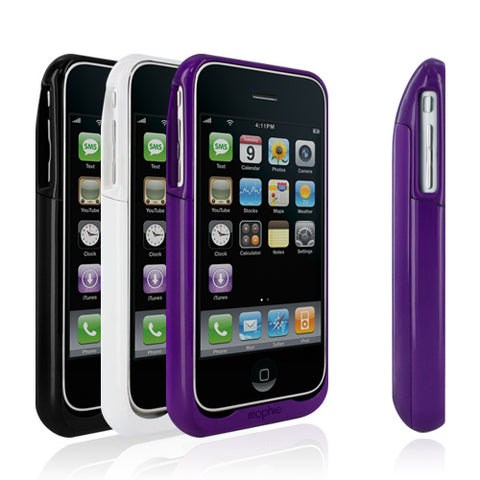
    Mophie Juice Pack Air at Apple Stores NOW!

    If you've seen me out-and-about, you've probably noticed the green backpack hugging my iPhone 3G. The Mophie Juice Pack is an add-on battery that gives additional life to iPhone 3G users (an iPod Touch model is also available).

    The folks at Mophie put the must-have iPhone 3G battery pack on a diet and the slimmer version: Mophie Juice Pack Air is available starting today at Apple Stores and online.

    Here's a quick table I hacked together to show how the two Mophie Juice Packs compare:
     OriginalAir
    Battery: Standby time (up to, hrs)350270
    Battery: Talk time (3G)64.5
    Battery: Internet use (3G)64.5
    Battery: Audio playback2820
    Battery: Video playback86
    Battery: capacity1800mAh1200mAh
    Weight (ounces)3?

    More in the press release from Mophie here:
    Mophie Announces Worldwide Availability of Juice Pack Air Accessory at Apple Stores and Apple.com

    World’s Thinnest ‘Works with iPhone’ External Battery/Protective Case almost doubles iPhone 3G battery life and offers the full protection of a hard-shell case in a low-profile design

    Los Angeles, CA – April 21, 2009 – mStation | mophie today announced the immediate availability of Juice Pack Air, currently the world’s thinnest Apple-certified external battery for iPhone 3G. The rechargeable 1200 mAH battery, integrated into an ultra-thin case, is now available worldwide at Apple retail stores and Apple.com for $79.95 in black, white, and purple.

    “Since debuting the Juice Pack Air last month, we’ve had an overwhelmingly positive response from around the world” says Ross Howe, sales and product development director for mStation | mophie. “The Juice Pack Air is an intuitive, ergonomic solution that provides added protection and external battery support in a low profile design. We think it’s poised to be one of the most essential iPhone 3G accessories ever introduced to the market.”

    Juice Pack Air features an innovative “standby mode” that allows users to control when they want to take advantage of additional battery support versus simply using it as a protective case. The integrated 4 LED charge status indicates how much power is remaining in the external battery. Unique pass-through design allows users to simultaneously charge their Juice Pack Air and sync their iPhone 3G with iTunes via the included USB cable.

    Additional battery time provided by Juice Pack Air:

    * Standby Time: Up to 270 hours
    * Talk Time: Up to 4.5 hours (3G) Up to 9 hours (2G)
    * Internet Use: Up to 4.5 hours (3G) Up to 5.4 Hours (Wi-Fi)
    * Audio Playback: Up to 20 hour
    * Video Playback: Up to 6 hours

    For more information on the Juice Pack Air, please visit http://www.mophie.com/products/juice-pack-air

    About mStation | mophie
    mStation is consistently praised for its ability to create quality products with cool Industrial Design. mStation recently acquired mophie, an iPod accessory company with a wide array of award-winning cases. Their products can be found in Apple Stores and major retailers worldwide.