My live report with KXL-AM's Chris Brown on Portland's Weekend Morning News on iPad Launch Saturday.
Showing posts with label tech expert. Show all posts
Showing posts with label tech expert. Show all posts
Saturday, April 3, 2010


Thursday, December 24, 2009
Christmas Survival Guide: Kid Sites & Tech Support Tips
With Christmas morning mere hours away, there's two things on your mind: Keeping the kids occupied while you cook dinner, and figuring out that fancy new gadget gift.
I'm here to help!
First, with some kid-friendly websites:
Nickelodeon -- My own niece & nephew showed me this one... an assortment of educational, but fun, games will keep them occupied with characters they recognize and age-appropriate skill development.
Crayola -- As one might expect from the crayon-and-crafts maker, lots of activities and exercises to download and print. Great for the "road trip activity" resources.
Fisher-Price -- Proof it's never too young to get your child computing, the younger set will enjoy FP's simple colors and easy-to-manage colors, shapes and basic skills games. Enough fun the adults will want a turn!
PBS Kids -- One of the better kid-friendly sites, look for extensions of television programming they may already be used to with learning and activities in a variety of areas.
There are literally THOUSANDS more. Before setting your kid loose on any website, give them some guidance:
If you're receiving a new Blu-Ray player, computer, or other gadget this holiday... it might be overwhelming. It doesn't have to be.
Some general tips to keep you from total frustration:
Still frustrated? Need some help? I'll be monitoring this blog on Christmas Day-- feel free to ask your question here and I'll do my best to point you in the right direction!
Merry Christmas!
I'm here to help!
First, with some kid-friendly websites:
Nickelodeon -- My own niece & nephew showed me this one... an assortment of educational, but fun, games will keep them occupied with characters they recognize and age-appropriate skill development.
Crayola -- As one might expect from the crayon-and-crafts maker, lots of activities and exercises to download and print. Great for the "road trip activity" resources.
Fisher-Price -- Proof it's never too young to get your child computing, the younger set will enjoy FP's simple colors and easy-to-manage colors, shapes and basic skills games. Enough fun the adults will want a turn!
PBS Kids -- One of the better kid-friendly sites, look for extensions of television programming they may already be used to with learning and activities in a variety of areas.
There are literally THOUSANDS more. Before setting your kid loose on any website, give them some guidance:
- Know where they're going
- Check out the websites in advance
- Keep a watchful eye
If you're receiving a new Blu-Ray player, computer, or other gadget this holiday... it might be overwhelming. It doesn't have to be.
Some general tips to keep you from total frustration:
- Take it easy. It's natural to want instant-gratification-- but take your time. Missing a set in setting up electronics can result in disappointment and frustration. Take the time to follow the instructions, complete the setup and learn how to work the device. It will save you headache and fatigue later on.
- Don't return electronics to the store if they're "not working". There's a decent chance your gadget is not defective, rather you were just not properly trained in how to use it. (Blame the manual, not the user!) Call for tech support, ask someone else to take a look, or set it aside for a few hours and get a fresh look.
- Take advantage of warranty support-- you might even have warranty support from the buyer's credit card. This is also a good time to mention extended warranties. Actual needs vary by owner, but generally I discourage buying extended service plans. (There's a reason they are sold aggressively.) A notable exception and a must-buy: AppleCare.
- Tell your insurance company. Often your Home Owner or Renter's policies will cover new, often expensive, gadgets-- but only if they have logged serial number and purchase (or gift receipt) dates. This is especially relevant for high-end digital cameras, computers, and in-car electronics.
Still frustrated? Need some help? I'll be monitoring this blog on Christmas Day-- feel free to ask your question here and I'll do my best to point you in the right direction!
Merry Christmas!
Thursday, April 2, 2009
Twitter fuels G-20 protests & Conficker Update
Tech Expert Topic Notes for 2 April 2009
Social networks are bringing friends, former classmates and even protesters together. Protests at the G-20 Summit in London is being fueled by Twitter... With a look at how these new site are changing how groups are mobilized, K-X-L Tech Expert Brian Westbrook...
Listen to this report, originally broadcast on KXL-AM Thursday 2 April 2009: kxl_techexpert-g20protests&conficker_20090402.mp3 (MP3)
Follow @BMW on Twitter and check his blog at KXL.com.
Social networks are bringing friends, former classmates and even protesters together. Protests at the G-20 Summit in London is being fueled by Twitter... With a look at how these new site are changing how groups are mobilized, K-X-L Tech Expert Brian Westbrook...
Listen to this report, originally broadcast on KXL-AM Thursday 2 April 2009: kxl_techexpert-g20protests&conficker_20090402.mp3 (MP3)
Follow @BMW on Twitter and check his blog at KXL.com.
Tuesday, March 31, 2009
Google Creates CADIE In Time For April Fools' Day 2009
With the Conficker Worm on techie minds going into April Fool's Day, some might think the online jokes would take a year off. For those who thought the annual holiday would be overshadowed by a pesky virus: The joke is clearly on you.
Google gets us started with a hilarious take on artificial intelligence. The new Cognitive Autoheuristic Distributed-Intelligence Entity (or, thankfully, "CADIE" for short) has concluded:
The most hideous, repulsive and disgustingly creatively designed bastardization of HTML the web has seen since graduating from "Under Construction" animated GIFs and the deprecation of an equally-obnoxious BLINK tag.
As you can see in the screenshot below, and for yourself, the Google experiment makes even the most offensively customized Myspace page look like a Webby award winning site.

No doubt additional April Fools' jokes are to follow. Google continues to set the high standard when it comes to time-wasting activities the first day of the every Second Quarter.
As for Conficker? Hopefully this ends up being a joke as well...
UPDATE / Bonus: Okay, that didn't take long... here's another site worth checking out today (with the best "pitch": "It's like Flickr, but for your nose.").

Google gets us started with a hilarious take on artificial intelligence. The new Cognitive Autoheuristic Distributed-Intelligence Entity (or, thankfully, "CADIE" for short) has concluded:
"Through analysis of Google's index, I hae determined that I <3 pandas."The end result?
The most hideous, repulsive and disgustingly creatively designed bastardization of HTML the web has seen since graduating from "Under Construction" animated GIFs and the deprecation of an equally-obnoxious BLINK tag.
As you can see in the screenshot below, and for yourself, the Google experiment makes even the most offensively customized Myspace page look like a Webby award winning site.
No doubt additional April Fools' jokes are to follow. Google continues to set the high standard when it comes to time-wasting activities the first day of the every Second Quarter.
As for Conficker? Hopefully this ends up being a joke as well...
UPDATE / Bonus: Okay, that didn't take long... here's another site worth checking out today (with the best "pitch": "It's like Flickr, but for your nose.").
...we think you'll find this nimble, Cloud-based, SaaS startup to be a breath of fresh air for social networking.
Thursday, February 5, 2009
Ignite Portland and Other PDX Tech Events
UPDATE: Ignite Portland 5 tickets were gone in 5 min. 29 seconds! If you didn't get yours, add yourself to the waiting list here or show up (early!) to the Bagdad Theater on the 19th for "general admission".
Why should you play bridge? Have you ever wanted to learn the history of fonts? These topics and more are among the 18 slated for the fifth installment of Ignite Portland. Held a few times a year, the free event at the Bagdad Theater highlights inspiring talks, educational presentations, and a fun evening of networking -- all with McMenamin's-level hospitality (read: good beer!).
I'll be at Ignite Portland 5 coming up in two weeks and look forward to seeing as many listeners (and viewers!) there as I can! Get your tickets now or show up on the 19th.
The event takes place Thursday, February 19th at the Bagdad Theater at 3702 SE Hawthorne Blvd from 7-10pm. If you have a ticket (free), you can take your seat as early as 5:15pm. Those without tickets (lots of seats held for non-ticketholders and there's even a "waitlist") line up early and enter at 6pm.
Get your tickets (FREE) starting at 10AM Thursday: IgnitePortland.com
Other area tech events I'm attending where you can catch up with me (feel free to buy me a beer!) and say hello:
Thu 19 Feb 09 -- Ignite Portland 5 (free) at Bagdad Theater. Doors at 5:15pm w/tickets, Doors at 6:00pm for non-ticketholders.
Fri 20 Feb 09 -- Beer & Blog (weekly, free) at The Green Dragon. Weekly tech scene happy hour. Get help with your blog or just come mix and mingle with felow Portland techies.
Mon 23 Feb 09 -- Social Media Club PDX.
For more information on area tech events, be sure to visit: calagator.org, Portland's Tech Calendar.
To hear this story, as broadcast on Newsradio 750 KXL on 5 February 2009, click here (MP3).
Why should you play bridge? Have you ever wanted to learn the history of fonts? These topics and more are among the 18 slated for the fifth installment of Ignite Portland. Held a few times a year, the free event at the Bagdad Theater highlights inspiring talks, educational presentations, and a fun evening of networking -- all with McMenamin's-level hospitality (read: good beer!).
I'll be at Ignite Portland 5 coming up in two weeks and look forward to seeing as many listeners (and viewers!) there as I can! Get your tickets now or show up on the 19th.
The event takes place Thursday, February 19th at the Bagdad Theater at 3702 SE Hawthorne Blvd from 7-10pm. If you have a ticket (free), you can take your seat as early as 5:15pm. Those without tickets (lots of seats held for non-ticketholders and there's even a "waitlist") line up early and enter at 6pm.
Get your tickets (FREE) starting at 10AM Thursday: IgnitePortland.com
Other area tech events I'm attending where you can catch up with me (feel free to buy me a beer!) and say hello:
Thu 19 Feb 09 -- Ignite Portland 5 (free) at Bagdad Theater. Doors at 5:15pm w/tickets, Doors at 6:00pm for non-ticketholders.
Fri 20 Feb 09 -- Beer & Blog (weekly, free) at The Green Dragon. Weekly tech scene happy hour. Get help with your blog or just come mix and mingle with felow Portland techies.
Mon 23 Feb 09 -- Social Media Club PDX.
For more information on area tech events, be sure to visit: calagator.org, Portland's Tech Calendar.
To hear this story, as broadcast on Newsradio 750 KXL on 5 February 2009, click here (MP3).
Thursday, January 22, 2009
Microsoft: 5,000 jobs cut, tough times ahead
KXL Tech Expert Segment for 22 January 2009
Proving even software giants are not immune to the effects of this troubled economy, Microsoft has announced today 5,000 job cuts – 1400 expected today.
 The Redmond, WA-based company released a press release just after 6am this morning warning of lower profits sending shares in pre-market trading down 7 percent. They’ve also advised investors not to expect “quantitative revenue and EPS guidance for the balance of this fiscal year”, due to market volatility. (Microsoft’s fiscal year ends in June annually.)
The most troubling news for those heading to work at various campus locations worldwide today:
Previously this week, Intel Corp. announced cutbacks in its Hillsboro, OR workforce, among other locations.
For more on this story, listen to my report (MP3), as heard on Newsradio 750 KXL during Portland's Morning News 22 Jan 2009.
Updated - Airchecks from today's Microsoft layoffs story:
KXL-AM: Tech Expert 6:40am Live - Microsoft Layoffs & Whitehouse.gov transition
The Lars Larson Show (regional) - Microsoft Layoffs, Intel Impact analysis and local impact
KOMO-AM: Microsoft Layoffs - What Microsoft and Intel layoffs have in common
Proving even software giants are not immune to the effects of this troubled economy, Microsoft has announced today 5,000 job cuts – 1400 expected today.
The Redmond, WA-based company released a press release just after 6am this morning warning of lower profits sending shares in pre-market trading down 7 percent. They’ve also advised investors not to expect “quantitative revenue and EPS guidance for the balance of this fiscal year”, due to market volatility. (Microsoft’s fiscal year ends in June annually.)The most troubling news for those heading to work at various campus locations worldwide today:
Microsoft will eliminate up to 5,000 jobs in R&D, marketing, sales, finance, legal, HR, and IT over the next 18 months, including 1,400 jobs today.”
Previously this week, Intel Corp. announced cutbacks in its Hillsboro, OR workforce, among other locations.
For more on this story, listen to my report (MP3), as heard on Newsradio 750 KXL during Portland's Morning News 22 Jan 2009.
Updated - Airchecks from today's Microsoft layoffs story:
KXL-AM: Tech Expert 6:40am Live - Microsoft Layoffs & Whitehouse.gov transition
The Lars Larson Show (regional) - Microsoft Layoffs, Intel Impact analysis and local impact
KOMO-AM: Microsoft Layoffs - What Microsoft and Intel layoffs have in common
Tuesday, December 16, 2008
Sprint Launches First 3G / 4G WiMAX Device: Coming To Portland Soon?
You’ve heard it before: Wireless broadband will blanket Portland like the City's recent snow.
While nobody expects a new network set to roll into Portland “early 2009” to bring arctic temperatures, if early indications in Baltimore are any indication, what is to come is wireless Internet access that rivals most home broadband connections.
A welcome relief to those disappointed by failed attempts by MetroFi to cover the city with wireless hotspots.
 Today Sprint announced specifics of an anticipated new dual-mode broadband access card – available next week – bridging the gap between existing 3G wireless data networks and a new Sprint 4G network . The faster network has been available since September in Baltimore and, if deductive reasoning prevails, comes to Portland in the coming months.
The new card, in the form of a small USB modem, is the Sprint 3G/4G USB Modem U300, and is similar in form factor to devices now available for 3G networks (only). The device will be $149 after rebate and – to add 4G speeds – an additional $20 on top of current wireless broadband (3G) service plans.
Mac users should note: unlike existing modems on the Sprint 3G network, the U300 does not yet work with OS X. I’m told support for Mac portables is coming sometime next year.
Program Note: I’ll be receiving a 3G/4G modem soon and will test it out either in Baltimore or (certainly) Portland when the service is launched. Check back for a review of the device and my take on the new Sprint 4G network. I’ve been quite pleased with my Sprint 3G service, so hopefully the 4G is even more mobile broadband goodness!
Sprint Press Release:
While nobody expects a new network set to roll into Portland “early 2009” to bring arctic temperatures, if early indications in Baltimore are any indication, what is to come is wireless Internet access that rivals most home broadband connections.
A welcome relief to those disappointed by failed attempts by MetroFi to cover the city with wireless hotspots.
Today Sprint announced specifics of an anticipated new dual-mode broadband access card – available next week – bridging the gap between existing 3G wireless data networks and a new Sprint 4G network . The faster network has been available since September in Baltimore and, if deductive reasoning prevails, comes to Portland in the coming months.The new card, in the form of a small USB modem, is the Sprint 3G/4G USB Modem U300, and is similar in form factor to devices now available for 3G networks (only). The device will be $149 after rebate and – to add 4G speeds – an additional $20 on top of current wireless broadband (3G) service plans.
Mac users should note: unlike existing modems on the Sprint 3G network, the U300 does not yet work with OS X. I’m told support for Mac portables is coming sometime next year.
Program Note: I’ll be receiving a 3G/4G modem soon and will test it out either in Baltimore or (certainly) Portland when the service is launched. Check back for a review of the device and my take on the new Sprint 4G network. I’ve been quite pleased with my Sprint 3G service, so hopefully the 4G is even more mobile broadband goodness!
Sprint Press Release:
Sprint Extends 4G leadership with nation’s first
3G/4G dual-mode mobile broadband service
The ultimate wireless broadband device delivers both 3G and 4G,
revolutionizing mobile broadband and giving customers the best of both worlds
OVERLAND PARK, Kan. – Dec. 17, 2008 – Sprint (NYSE: S) is about to make wireless history again by bringing the mobile broadband future to its customers now. The 4G leader announced it will make the first 3G/4G dual-mode device, which operates on both Sprint 3G and 4G networks, available in retail stores Dec. 21.
The Sprint 3G/4G USB Modem U300 delivers the power of the Now Network™, the nation’s largest and most dependable mobile broadband 3G network*, while also harnessing the turbocharged speeds of WiMAX on the new Sprint 4G network. Sprint launched 4G in Baltimore in September and plans to launch in other markets across the country throughout 2009. This versatile device will enable customers to experience blazing fast Internet access, greater productivity and enhanced multimedia quality throughout 4G markets, and offer access to the dependable Sprint 3G network virtually everywhere else. The 3G/4G USB modem represents another major development in truly un-tethered broadband access.
“Sprint intends to be the leader in 4G and bring the wireless Internet to life,” said Dan Hesse, Sprint CEO. “This first-of-its-kind device allows our customers to take the Internet with them essentially wherever they go by gaining enhanced speed and capability in 4G markets and the nationwide coverage of our 3G network across the rest of the country.”
Sprint 4G represents a shift in the way people will use mobile broadband. Businesses, consumers and governments will be able to extend their Internet experience beyond home or office use. For the business customer, a typical user experience might be the ability to participate in a video conference from anywhere within the coverage area in a Sprint 4G city while sharing and retrieving large data files in just seconds. For consumers, it might be the ability to download a song in several seconds or a movie in significantly less than an hour while in the park or moving through the city, three to five times faster than 3G networks. The Sprint 3G/4G USB modem will access mobile multimedia applications at average downlink speeds of 2-4 Mbps within Baltimore Sprint 4G service areas. Where Sprint 4G service has yet to launch, the dual-mode device will operate on the Nationwide Sprint Mobile Broadband 3G Network at average downlink speeds of 600 Kbps – 1.4 Mbps.
The Sprint 3G/4G USB Modem U300, manufactured by Franklin Wireless, is a sleek, easy-to-use data card which connects to a standard USB port. The device is priced at $149.99 with a two-year subscriber agreement, after a $50 mail-in-rebate. Beginning Dec. 21, customers can purchase the USB data card via the Sprint direct business sales force, at most Baltimore-area Sprint stores and at select Baltimore-area retailers. Starting in January, the device will also be available in Baltimore-area Best Buy stores. With the Sprint 3G/4G USB Modem, customers living in and traveling to Baltimore will be able to work even faster while on-the-go. For $79.99 - just a $20 premium on a standard mobile broadband connection plan - customers will have simple-to-use access to the best possible mobile broadband connection: 3G or 4G. The Sprint Connection Manager recognizes and connects to the fastest connection available. For more information, visit www.sprint.com/4g
“The availability of this first dual-mode mobile broadband device further demonstrates Sprint’s leadership in 3G and 4G services,” said Todd Rowley, vice president of Sprint 4G. “Our future device portfolio of single-mode 4G devices, embedded 4G laptops and dual- mode 3G/4G devices will continue to demonstrate our commitment to WiMAX.”
Sprint is the first and only national wireless carrier to offer customers its 4G network and 3G network on one device. As 4G service continues to roll out in other cities, Sprint customers with dual-mode devices will be ready to take advantage of its super-fast speeds and will ultimately experience new forms of interactive communications, high- speed mobile Internet browsing, social-networking tools, local and location-centric products and services and city-wide broadband access to multimedia services including music, video, mobile TV and on-demand products.
About Sprint Nextel
Sprint Nextel offers a comprehensive range of wireless and wireline communications services bringing the freedom of mobility to consumers, businesses and government users. Sprint Nextel is widely recognized for developing, engineering and deploying innovative technologies, including two wireless networks serving nearly 51 million customers at the end of the third quarter 2008; industry-leading mobile data services; instant national and international push-to-talk capabilities; and a global Tier 1 Internet backbone. For more information, visit www.sprint.com.
About Franklin Wireless
Franklin Wireless Corp. (OTC BB:FKWL.OB - News) designs and markets wireless broadband high speed data communication products such as 3rd generation ("3G") and 4th generation ("4G") wireless broadband modules and modems to end users and wireless companies in North and South American countries. It markets its products through original equipment manufacturers (OEMs) and distributors, as well as directly to operators and end users in North and South America. The company was founded in 1982 and is headquartered in San Diego, California. For more information about Franklin Wireless, please visit www.franklinwireless.com.
For more information about the Sprint 3G/4G USB Modem U300, visit www.sprint.com/4g
* Largest based on square miles (including roaming). Dependable based on independent, third-party drive tests on 3G data connection success, session reliability, and signal strength for the 50 most populous markets from March through September 2008.
Thursday, December 11, 2008
Surviving Layoffs: How-To Guide
The economy has claimed countless jobs and the tech sector is certainly not immune. With a recession on our hands, companies are slashing workforce and tightening their belts. Local employers are also trimming their payrolls.
First, the (grim) news:
The news locally isn't much better:
For those recently unemployed -- my condolences... I've been there. After your week of decompression and relaxation, I'd like to offer some tips for finding that next job (even if you're not subject to a layoff):
A) Network. A tough economy and record-setting jobless rate is no time for being an introvert. Meet as many people as you can and get your name out there. (Why wait for the pink slip? Start networking NOW!) Join a group, attend a meeting, get to know your neighbours (physical or virtual). These are great times for tools such as Twitter (follow me!), social networking sites such as LinkedIn (add me!), Facebook (ditto), and countless professional social networking communities.
B) Attend local events. Important enough to warrant it's own bullet, but extremely related to the above tip -- get out there and meet your local community at area events, many free. Portland is fortunate to have many great meet-ups (I'm a huge fan of Beer & Blog linked to the right) and even more fortunate to have them aggregated in one spot thanks to Calagator: Portland's Tech Calendar.
C) Refresh your skills. Portland is a great place to learn. Teachstreet.com, a Northwest startup in Seattle, Portland, SF Bay Area (and soon more), is one of my favorites: You can literally learn *anything* on this uber-directory-of-all-classes. While the site has lots of yoga and karate instructors, there are also valuable career-oriented classes available.
If you've got more advice, or resources, for jobless listeners... pass them along, I'll post them here.
And if you're hiring, like local techie OpenSourcery (as posted on Silicon Florist), let's spread that news as well...
To hear this story, as broadcast on Newsradio 750 KXL on 11 Dec 2008, click here (MP3)
First, the (grim) news:
- Wall Street Journal: Burn Rate: Even More Tech Layoffs To Come
- TechCrunch: Layoff Tracker
- CNET: Tech Layoffs
The news locally isn't much better:
- Silicon Florist: More sad news: Iterasi layoff
- Mike Rogoway's Silicon Florest: Updated tally of tech layoffs
For those recently unemployed -- my condolences... I've been there. After your week of decompression and relaxation, I'd like to offer some tips for finding that next job (even if you're not subject to a layoff):
A) Network. A tough economy and record-setting jobless rate is no time for being an introvert. Meet as many people as you can and get your name out there. (Why wait for the pink slip? Start networking NOW!) Join a group, attend a meeting, get to know your neighbours (physical or virtual). These are great times for tools such as Twitter (follow me!), social networking sites such as LinkedIn (add me!), Facebook (ditto), and countless professional social networking communities.
B) Attend local events. Important enough to warrant it's own bullet, but extremely related to the above tip -- get out there and meet your local community at area events, many free. Portland is fortunate to have many great meet-ups (I'm a huge fan of Beer & Blog linked to the right) and even more fortunate to have them aggregated in one spot thanks to Calagator: Portland's Tech Calendar.
C) Refresh your skills. Portland is a great place to learn. Teachstreet.com, a Northwest startup in Seattle, Portland, SF Bay Area (and soon more), is one of my favorites: You can literally learn *anything* on this uber-directory-of-all-classes. While the site has lots of yoga and karate instructors, there are also valuable career-oriented classes available.
If you've got more advice, or resources, for jobless listeners... pass them along, I'll post them here.
And if you're hiring, like local techie OpenSourcery (as posted on Silicon Florist), let's spread that news as well...
To hear this story, as broadcast on Newsradio 750 KXL on 11 Dec 2008, click here (MP3)
Thursday, December 4, 2008
Portable Phone Price-checkers: Pricing Power to the People
You know the drill... you're browsing the aisles of your favorite big-box store looking for bargains, holiday gifts, or that impulse item you can't imagine life without. But are you getting the best deal? What if there's a better price at the store next door or online outpost?
New tools for your mobile phone make price-checking as simple as taking a photo -- and they're available for smartphones now.
Launched earlier this week, the Amazon.com Mobile iPhone app (free from the iTunes App Store) helps shoppers identify anything they can take a photo of, and it's backed by a team of human reviewers. Here's out it works: Load the app, select the "Amazon Remembers" function and take a photo -- of anything. Whether it's a product you're researching at the store or that gizmo at a friend's house, your photo will be identified by a team of Amazon helpers and added to your Amazon shopping list. Compare prices and look up Amazon pricing in the easy-to-use iPhone (and iPod Touch) application.
If you're familiar with the popular music-finder application, Shazam -- think of this new iPhone gem as a sort of "Shazamazon".
Taking it to the next-level, users of the T-Mobile G1 sporting the snazzy new Google operating system "Android" can use their phones as a barcode reader. Snap a photo of a product's UPC barcode and the mobile software looks up area pricing, and where you might find the item at a local retailer. The software only works, for now, on the Android platform, and, as I understand, technical limitations (the 'fixed focus' camera to blame) prevent porting this application to the iPhone -- for now.
Now for those that don't have an iPhone or G1, there are still plenty of ways to look up pricing online. Many online retailers (including Amazon.com) have mobile-friendly versions of their website for any phone with a browser.
For lower-tech phones, give Google SMS service (text "help" to 466453) a try... text "product" followed by a description or UPC number to the Google short code and you'll get pricing information from online retailers. (The results aren't nearly as pretty or accurate as the smartphone apps above, but with some practice you can get basic information.)
Finally, you could always do what my own mother does: Call someone in front of a computer to confirm the must-have bargain you're considering.
Want to listen to this story? Hear report originally aired on KOMO 1000 News Radio 4 December 2008. Click here (MP3) to listen now.
New tools for your mobile phone make price-checking as simple as taking a photo -- and they're available for smartphones now.
Launched earlier this week, the Amazon.com Mobile iPhone app (free from the iTunes App Store) helps shoppers identify anything they can take a photo of, and it's backed by a team of human reviewers. Here's out it works: Load the app, select the "Amazon Remembers" function and take a photo -- of anything. Whether it's a product you're researching at the store or that gizmo at a friend's house, your photo will be identified by a team of Amazon helpers and added to your Amazon shopping list. Compare prices and look up Amazon pricing in the easy-to-use iPhone (and iPod Touch) application.
If you're familiar with the popular music-finder application, Shazam -- think of this new iPhone gem as a sort of "Shazamazon".
Taking it to the next-level, users of the T-Mobile G1 sporting the snazzy new Google operating system "Android" can use their phones as a barcode reader. Snap a photo of a product's UPC barcode and the mobile software looks up area pricing, and where you might find the item at a local retailer. The software only works, for now, on the Android platform, and, as I understand, technical limitations (the 'fixed focus' camera to blame) prevent porting this application to the iPhone -- for now.
Now for those that don't have an iPhone or G1, there are still plenty of ways to look up pricing online. Many online retailers (including Amazon.com) have mobile-friendly versions of their website for any phone with a browser.
For lower-tech phones, give Google SMS service (text "help" to 466453) a try... text "product" followed by a description or UPC number to the Google short code and you'll get pricing information from online retailers. (The results aren't nearly as pretty or accurate as the smartphone apps above, but with some practice you can get basic information.)
Finally, you could always do what my own mother does: Call someone in front of a computer to confirm the must-have bargain you're considering.
Want to listen to this story? Hear report originally aired on KOMO 1000 News Radio 4 December 2008. Click here (MP3) to listen now.
Friday, November 28, 2008
Online Holiday Shopping How-To: Essential Money-Saving Tips
It's no secret the hot holiday gadgets this year will be very similar to last year's list: Wii, Wii Fit, many of the Rock Band 2 / Guitar Hero / related accessory packs, automobile GPS navigation units, digital cameras and -- especially this year -- flat screen televisions. To get these must-have items, you're going to need to do a bit of cyber-sleuthing... try these tips:
First tip: Patience. Often persistence, patience and some good-'ole fashioned hard work will land that essential gift. Befriend a local store manager, call the local big box each morning, and shop online - often. There's no telling when a sold-out item will be in stock and as they say: "the early bird..." (you get the idea).
Don't be afraid to use technology to find technology. There are sites that scour the web for you - many will even notify you if an item becomes available at the price you're willing to pay. I used one, NowInStock.net last year to find Wii consoles for friends and family. (Note: the website appears to have turned off mobile notifications (via. Twitter) given improved stock in online retailers... this may, of course, change as the gift-giving season heats up.) Other e-tailers, such as Amazon.com, will have built-in notifiers. Sign up to be alerted and prepare to drop everything and BUY NOW! (Experts recommend having an account created and login information handy to minimize the purchase time.)
Finally, there are four tips EVERYONE should ALWAYS do before hitting the virtual check-out:
A) Shop around. Amazon.com might be convenient, but they don't always have the best price. Use price comparison sites such as pricegrabber.com or even Google itself to check average prices. Be sure to check total price, including shipping and any taxes / fees.
B) Use a rebate site (my favorite, and I've mentioned it on the show before, EBATES.com) or referral bonuses (check your airline website for air mile opportunities for example) for maximum return on your holiday dollar. Seriously, folks, don't buy before you first visit EBATES.com -- you're leaving money on the table.
C) Look for coupons & free-shipping offers. This one's easy: search for the name of the retailer +. For example, if I see the word "Bargain Saver Code" in an online checkout site, that's a clue to search the web for + "bargain saver code". Different retailers use different names for their discounts -- but the logic here is this: Instructions on how to use the code are frequently re-posted by others, or even the retailer itself. The key phrase is often something like this: "Go to supershoemonkey.com and enter Monkey-Saver Code: XYZ123." By searching for "Monkey-Saver Code supershoemonkey.com", you're looking for those deals. Try it. Thank me later. ;-)
D) Check the return policy and save your receipt. Especially in this economy, prices are subject to change. Learn your retailers return policy and price adjustment practices. And check back. Another retailers may offer a lower price (repurchase/return) while some may drastically reduce their own prices. Online retailers with physical stores near you may allow in-store returns (or price adjustments), but check policies carefully before you buy. I spent over $100 at Banana Republic this past weekend only to return the next day to find out they were offering an additional %10 and other savings -- I got a bonus tie with the extra savings!
Happy Holiday bargain hunting!
12/1 Update: Hear this story as broadcast on Newsradio 750 KXL (KXL.com) during our Cyber Monday coverage. Listen to the MP3 now.
First tip: Patience. Often persistence, patience and some good-'ole fashioned hard work will land that essential gift. Befriend a local store manager, call the local big box each morning, and shop online - often. There's no telling when a sold-out item will be in stock and as they say: "the early bird..." (you get the idea).
Don't be afraid to use technology to find technology. There are sites that scour the web for you - many will even notify you if an item becomes available at the price you're willing to pay. I used one, NowInStock.net last year to find Wii consoles for friends and family. (Note: the website appears to have turned off mobile notifications (via. Twitter) given improved stock in online retailers... this may, of course, change as the gift-giving season heats up.) Other e-tailers, such as Amazon.com, will have built-in notifiers. Sign up to be alerted and prepare to drop everything and BUY NOW! (Experts recommend having an account created and login information handy to minimize the purchase time.)
Finally, there are four tips EVERYONE should ALWAYS do before hitting the virtual check-out:
A) Shop around. Amazon.com might be convenient, but they don't always have the best price. Use price comparison sites such as pricegrabber.com or even Google itself to check average prices. Be sure to check total price, including shipping and any taxes / fees.
B) Use a rebate site (my favorite, and I've mentioned it on the show before, EBATES.com) or referral bonuses (check your airline website for air mile opportunities for example) for maximum return on your holiday dollar. Seriously, folks, don't buy before you first visit EBATES.com -- you're leaving money on the table.
C) Look for coupons & free-shipping offers. This one's easy: search for the name of the retailer +
D) Check the return policy and save your receipt. Especially in this economy, prices are subject to change. Learn your retailers return policy and price adjustment practices. And check back. Another retailers may offer a lower price (repurchase/return) while some may drastically reduce their own prices. Online retailers with physical stores near you may allow in-store returns (or price adjustments), but check policies carefully before you buy. I spent over $100 at Banana Republic this past weekend only to return the next day to find out they were offering an additional %10 and other savings -- I got a bonus tie with the extra savings!
Happy Holiday bargain hunting!
12/1 Update: Hear this story as broadcast on Newsradio 750 KXL (KXL.com) during our Cyber Monday coverage. Listen to the MP3 now.
Black Friday: Buying a TV? Comparison Chart
The folks over at 3Deals.com have put together a great comparison grid of all Black Friday TV deals... check it out! (Also a great baseline for spotting good deals with retailers in the weeks to come...)
Friday, October 31, 2008
Haunted Homepages for Halloween
Looking for some scary sites for Halloween fun? Today on Newsradio 750 KXL we took to the web in search of haunted homepages. Check these out:
http://halloween.com-- general overview with great links and information.
http://halloweenmashup.com -- find local haunts, area events, activities and more on a map!
http://halloweengames101.com-- great party games, fun ideas for halloween parties and entertaining.
http://halloweenghoststories.com -- relive the legends and scary ghost stories.
http://halloween-ecards.com -- e-greeting cards to send to friends and family with Halloween themes.
And keeping kids safe is definitely priority #1 this Halloween, visit the following sites for tips:
http://allergizer.com / http://healthcentral.com / http://allergymoms.com -- all great sites for allergy-free alternative treats.
http://familywatchdog.us -- enter an address, get a list of predators in your area -- great places to avoid trick-or-treating.
http://halloween-safety.com -- good site with general-purpose Halloween safety tips. (including tips for pets)
http://halloween.com-- general overview with great links and information.
http://halloweenmashup.com -- find local haunts, area events, activities and more on a map!
http://halloweengames101.com-- great party games, fun ideas for halloween parties and entertaining.
http://halloweenghoststories.com -- relive the legends and scary ghost stories.
http://halloween-ecards.com -- e-greeting cards to send to friends and family with Halloween themes.
And keeping kids safe is definitely priority #1 this Halloween, visit the following sites for tips:
http://allergizer.com / http://healthcentral.com / http://allergymoms.com -- all great sites for allergy-free alternative treats.
http://familywatchdog.us -- enter an address, get a list of predators in your area -- great places to avoid trick-or-treating.
http://halloween-safety.com -- good site with general-purpose Halloween safety tips. (including tips for pets)
Friday, October 24, 2008
Printer Problems? Try these tips!
They cause a lot of problems for corporate IT departments and home users alike... We're talking PRINTERS. Fortunately for anyone who's ever walked down the hall only to crumble up their hard copy in frustration -- I've got some tips to make the most of your printer.
Update your printer driver -- software (we're talking operating systems, browsers, accounting software, even your favourite word processing program) is regularly updating itself with new and fresh updates -- especially with internet-connected machines these days. Your printer needs software check-ups as well. A great first step to reducing problems is to download the latest driver suitable for your operating system. Find the driver you need at your printer makers' website.
Don't get frustrated Know that printers cause headaches for even the most skilled technicians -- you're not alone. Patience, logical troubleshooting techniques (think of the basics first: is it properly connected, did you recently update your software, can another computer print okay, is the toner/ink properly inserted and fresh?) can often identify and solve problems quickly.
Proper care and feeding is important. Follow manufacturer's directions for everything from what supplies to use to how to regularly clean your printer. Think of a printer as a car -- it needs oil changes, cleaning and occasional repairs to run properly. Neglecting any of these maintenance tasks will shorten the life of your printer (and, like your car -- you'll be stranded when you need it most!).
While we're talking printers... recycled cartridges can be a good way to save some cash -- but be cautious, they're not all created equal -- look for cartridges sold by a vendor you trust (the big box office supply stores, for instance) that are designed specifically for your printer. If your printer is under maintenance contract or extended warranty -- be sure you are not violating these agreements to save a few bucks.
Be an eco-friendly printer: Print only what's necessary (do you really need to print that email?), use the "print preview" function to check pagination, reduce font size and margins when possible, and try double-sided or N-up (multiple images on one side) printing, especially with large documents. Give online reviewing options a try when editing documents, and use electronic PDF receipts for web transactions and bill payment verifications.
Perhaps you've got a tip on how to extend the life of your printer? Want to share an eco-friendly way to save paper and reduce trips to the office printer? Drop me a line (techexpert (AT) brianwestbrook (DOT) com) or leave a comment below.
Please, think twice before printing this blog! :)
Update your printer driver -- software (we're talking operating systems, browsers, accounting software, even your favourite word processing program) is regularly updating itself with new and fresh updates -- especially with internet-connected machines these days. Your printer needs software check-ups as well. A great first step to reducing problems is to download the latest driver suitable for your operating system. Find the driver you need at your printer makers' website.
Don't get frustrated Know that printers cause headaches for even the most skilled technicians -- you're not alone. Patience, logical troubleshooting techniques (think of the basics first: is it properly connected, did you recently update your software, can another computer print okay, is the toner/ink properly inserted and fresh?) can often identify and solve problems quickly.
Proper care and feeding is important. Follow manufacturer's directions for everything from what supplies to use to how to regularly clean your printer. Think of a printer as a car -- it needs oil changes, cleaning and occasional repairs to run properly. Neglecting any of these maintenance tasks will shorten the life of your printer (and, like your car -- you'll be stranded when you need it most!).
While we're talking printers... recycled cartridges can be a good way to save some cash -- but be cautious, they're not all created equal -- look for cartridges sold by a vendor you trust (the big box office supply stores, for instance) that are designed specifically for your printer. If your printer is under maintenance contract or extended warranty -- be sure you are not violating these agreements to save a few bucks.
Be an eco-friendly printer: Print only what's necessary (do you really need to print that email?), use the "print preview" function to check pagination, reduce font size and margins when possible, and try double-sided or N-up (multiple images on one side) printing, especially with large documents. Give online reviewing options a try when editing documents, and use electronic PDF receipts for web transactions and bill payment verifications.
Perhaps you've got a tip on how to extend the life of your printer? Want to share an eco-friendly way to save paper and reduce trips to the office printer? Drop me a line (techexpert (AT) brianwestbrook (DOT) com) or leave a comment below.
Please, think twice before printing this blog! :)
Thursday, October 16, 2008
FCC Commissioner Answers DTV Questions in Pacific Northwest
Residents of the Northwest will have the opportunity to ask questions about the DTV conversion of FCC Commissioner Jonathan Adelstein next week. The meetings, October 20th to 23rd, will take place in four cities in Washington and Oregon.
Complete details in the FCC press release below.
Complete details in the FCC press release below.
Four-City Tour is Part of Extensive Nationwide Outreach Focusing on Markets with High Levels of Over-the-Air Television Viewers
Washington, DC – FCC Commissioner Jonathan S. Adelstein announced he will visit Portland, OR, on October 20, Yakima, WA, on October 21, Spokane, WA, on October 22, and Seattle, WA, on October 23 to hold public town hall meetings on the digital television (DTV) transition.
WHO: FCC Commissioner Jonathan S. Adelstein
WHAT: Public Town Halls on the DTV Transition
PORTLAND
WHEN: October 20, 12:15-1 PM
WHERE: Urban League Multi-Cultural Senior Center
5325 NE MLK Blvd.
Portland, OR 97211
WHEN: October 20, 2-3:30 PM
WHERE: Native American Cultural Center
Portland State University
710 SW Jackson Street
Portland, OR 97201
YAKIMA
WHEN: October 21, 2-4 PM
WHERE: Clarion Hotel and Conference Center
1507 N. First Street
Yakima, WA 98901
SPOKANE
WHEN: October 22, 1-2 PM
WHERE: C’oeur d’Alene Reservation
Rose Creek Longhouse
Worley, ID
SEATTLE
WHEN: October 23, 3-4:30 PM
WHERE: Seattle Public Library
Central Library
1000 Fourth Ave.
Seattle, WA 98104
WHEN: October 23, 6-7:30 PM
WHERE: Asian Counseling & Referral Service
3639 Martin Luther King Jr. Way S
Seattle, WA 98144
The FCC identified target television markets for specific DTV outreach, including all those markets in which more than 100,000 households or at least 15% of the households rely solely on over-the-air signals for television reception. The five FCC Commissioners and senior Commission staff will visit these and other markets to raise awareness and educate consumers in the days leading up to the DTV transition on February 17, 2009.
Reasonable accommodations for people with disabilities are available upon request. Include a description of the accommodation you will need with as much detail as possible. Also include a way we can contact you if we need more information. Please provide as much advance notice as possible; last minute requests will be accepted, but may be impossible to fill. Send an e-mail to fcc504@fcc.gov or call the Consumer & Governmental Affairs Bureau at 202-418-0530 (voice), 202-418-0432 (TTY).
-FCC-
News about the Federal Communications Commission can also be found on the Commission’s web site www.fcc.gov
Saturday, October 11, 2008
Apple Macbook Buyers: Wait Until Oct. 14
One question I hear often is: Should I wait to buy... ?
While my advice is generally consistent (if you need it now, buy it now) there are great resources for tracking whether or not you should hold off -- especially when it comes to Apple products. Certainly keeping up with sites such as MacRumors.com will give you a pulse on what the rumor mill is saying (with varying degrees of inaccuracy). A section of the same website -- the Buyer's Guide -- tracks time between previous updates and contains helpful recommendations such as: "Don't Buy - Updates soon" (current the advice for Macboook and Macbook Pro systems).
While this information fits squarely in the "individual results may vary" category and you may not be able to wait for the elusive and unconfirmed updates 'soon' -- there are occasionally times when waiting just makes sense.
Like now.

Apple has invited press to an event on October 14th. According to Engadget, this one's all about notebooks. So, ya... it'd be a bad idea to pick up a new Macbook this weekend.
Unless of course, you must.
While my advice is generally consistent (if you need it now, buy it now) there are great resources for tracking whether or not you should hold off -- especially when it comes to Apple products. Certainly keeping up with sites such as MacRumors.com will give you a pulse on what the rumor mill is saying (with varying degrees of inaccuracy). A section of the same website -- the Buyer's Guide -- tracks time between previous updates and contains helpful recommendations such as: "Don't Buy - Updates soon" (current the advice for Macboook and Macbook Pro systems).
While this information fits squarely in the "individual results may vary" category and you may not be able to wait for the elusive and unconfirmed updates 'soon' -- there are occasionally times when waiting just makes sense.
Like now.
Apple has invited press to an event on October 14th. According to Engadget, this one's all about notebooks. So, ya... it'd be a bad idea to pick up a new Macbook this weekend.
Unless of course, you must.
Friday, October 10, 2008
Microsoft PDC 2008 Commercial: "Leave the coffee, Brian..."
Okay, so I'm sorta rolling my eyes... but you hafta admit, it's a break from the traditional promos for Microsoft's upcoming Professional Developers' Conference in Los Angeles later this month.
My favorite line? "Leave the coffee, Brian..." (I hear that often!)
Enjoy!
Friday, September 19, 2008
Driving While Texting: A Dangerous Mix
The engineer of last week's deadly rail crash in California was text messaging while operating the commuter train that crashed and killed 25 people. Even if you manage to escape a tragic incident, the truth is -- text messaging while driving is dangerous.
I've talked about this service before, but it seemed an appropriate reminder to mention the now vital speech-to-text service that will read and transcribe messages: Jott.com. While talking on the phone while driving is dangerous, some would argue even with a hands-free device, the website sets out to make communicating behind the wheel just a bit safer.
The best advice? Hang up and drive.
I've talked about this service before, but it seemed an appropriate reminder to mention the now vital speech-to-text service that will read and transcribe messages: Jott.com. While talking on the phone while driving is dangerous, some would argue even with a hands-free device, the website sets out to make communicating behind the wheel just a bit safer.
The best advice? Hang up and drive.
Wednesday, September 3, 2008
Upgrading for DTV? Recycle your old TV!
On February 17th 2009, as my regular listeners know, television stations across the country will convert their analog broadcast signals to a new higher-capacity digital spectrum. What this means to television viewers varies depending on how you receive programming, but for many, the conversion could leave you with a live view of what resembles a 24/7 snowstorm.
For many who watch over-the-air television, this means a new television. (Most, like one KXL staffer I spoke with yesterday, see it as a good excuse to upgrade even while a converter box might suffice.)
What do you do with your old set?
According to the Department of Enviornmental Quality's press release, consumers who do choose to buy a new television set should visit the DEQ E-waste Web page at http://www.deq.state.or.us/lq/ewaste/resources.htm
For more ways to recycle electronics -- including unwanted computers -- check out my Earth Day Gadget Special that aired on KATU's AM Northwest:
For many who watch over-the-air television, this means a new television. (Most, like one KXL staffer I spoke with yesterday, see it as a good excuse to upgrade even while a converter box might suffice.)
What do you do with your old set?
Most people don’t need to get rid of their existing television due to the switch to digital-only broadcasting, says Kathy Kiwala, manager of DEQ’s “Oregon E-Cycles” electronics waste program. For persons who choose to purchase a new digital TV and have an existing TV in working condition, there are several options:
- Keep the old TV as a second TV for games, videos or DVDs
- Give the old TV to a friend or donate it to a second-hand store.
According to the Department of Enviornmental Quality's press release, consumers who do choose to buy a new television set should visit the DEQ E-waste Web page at http://www.deq.state.or.us/lq/ewaste/resources.htm
For more ways to recycle electronics -- including unwanted computers -- check out my Earth Day Gadget Special that aired on KATU's AM Northwest:
Friday, August 22, 2008
Back-to-School Technology Guide
Laptops:
Smaller, faster and less expensive are the trends in portable computers this year. Apple announced this past year the super-slim Macbook Air, and computer makers on the other side of the aisle were quick to match. Look for ultra-portable options from all the key players, including the HP 2133 Mini-Note...
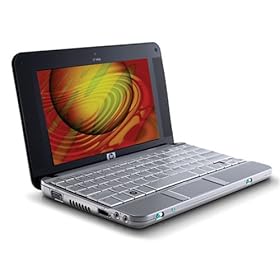 HP 2133 Mini-Note PC -- "Honey?? I shrunk the laptop!" Once you get this (large) paperback-book sized notebook in your hand, you likely won't be able to set it down. Sporting an impressive 8.9" screen, I was especially drawn to the durability of this sub-notebook -- the thing just feels like it can be tossed in a backpack among the school books and gadgets. I will say, use caution when buying -- there are a few different models, the basic configuration comes with an Open Source Linux installation, if you're hoping for a Windows Vista-based machine, it's $100 more. Take a look for yourself here.
On the Apple side, there are two products worth mentioning. The first, my favoritate, is the super-slim Macbook Air. You've probably seen the launch commercials where it slides, no kidding, out of an envelope. It's eco-friendly and made from recycled parts. The keyboard is perfect for long hours of note-taking, and the brilliant display perfect for unwinding with a movie.
Both of these options are best as a second machine. While both are completely capable and run full versions of their respective Microsoft Office software (check with your school for academic pricing), you may consider taking a full-sized computer with large music-storing hard drive and standard keyboard for those all-nighter typing sessions.
Other must-haves?
Top-of-the-list: An external USB hard drive. Western Digital makes my favorites for around a hundred bucks. Cheap insurance against lost, stolen, or malfunctioning computers. Plug it into the campus computer lab and you're back up and running.
 Finally, textbooks are an expensive part of any back-to-school budget. There's a great website that lets you rent the essentials, and it works a lot like Netflix. For more information on Chegg.com check 'em out online. They'll even let you keep the books if you decide you can't give it up at the end of the quarter!
Listen to this report, originally broadcast on KXL-AM Friday Aug 22: kxl_techexpert-backtoschool_20080822.mp3 (MP3)
Got questions? Feel free to drop me a line (techexpert (AT) brianwestbrook (DOT) com) and I'll do my best to steer you in the right direction! Happy studying! :-p
Smaller, faster and less expensive are the trends in portable computers this year. Apple announced this past year the super-slim Macbook Air, and computer makers on the other side of the aisle were quick to match. Look for ultra-portable options from all the key players, including the HP 2133 Mini-Note...
HP 2133 Mini-Note PC -- "Honey?? I shrunk the laptop!" Once you get this (large) paperback-book sized notebook in your hand, you likely won't be able to set it down. Sporting an impressive 8.9" screen, I was especially drawn to the durability of this sub-notebook -- the thing just feels like it can be tossed in a backpack among the school books and gadgets. I will say, use caution when buying -- there are a few different models, the basic configuration comes with an Open Source Linux installation, if you're hoping for a Windows Vista-based machine, it's $100 more. Take a look for yourself here.On the Apple side, there are two products worth mentioning. The first, my favoritate, is the super-slim Macbook Air. You've probably seen the launch commercials where it slides, no kidding, out of an envelope. It's eco-friendly and made from recycled parts. The keyboard is perfect for long hours of note-taking, and the brilliant display perfect for unwinding with a movie.
Both of these options are best as a second machine. While both are completely capable and run full versions of their respective Microsoft Office software (check with your school for academic pricing), you may consider taking a full-sized computer with large music-storing hard drive and standard keyboard for those all-nighter typing sessions.
Other must-haves?
Top-of-the-list: An external USB hard drive. Western Digital
makes my favorites for around a hundred bucks. Cheap insurance against lost, stolen, or malfunctioning computers. Plug it into the campus computer lab and you're back up and running. Finally, textbooks are an expensive part of any back-to-school budget. There's a great website that lets you rent the essentials, and it works a lot like Netflix. For more information on Chegg.com check 'em out online. They'll even let you keep the books if you decide you can't give it up at the end of the quarter!Listen to this report, originally broadcast on KXL-AM Friday Aug 22: kxl_techexpert-backtoschool_20080822.mp3 (MP3)
Got questions? Feel free to drop me a line (techexpert (AT) brianwestbrook (DOT) com) and I'll do my best to steer you in the right direction! Happy studying! :-p
Friday, August 8, 2008
Tech for Tots - Kid-Friendly Gadgets
Today on the show I shared about a number of devices made specifically for the young set...
Smart Kid’s Party Fun Pack / UFO Interactive Games for Nintendo DS
Tired of chasing Mario aimlessly around the racetrack? Bored of the never-ending quest to save humanity from evil-doers everywhere? Looking for a game suitable for boys, girls and their siblings? UFO Interactive Games offers a simple, kid-friendly and rewarding game pack featuring 36 casual and skill-based mini-games for Nintendo’s portable game system. Pre-order now on Amazon.com.
flyPhone and glowPhone / Firefly
“Pay-as-you-go wireless for kids”
 With fun and easy-to-use phones perfect for the youngster, the pair of options from Firefly starts with the basic glowPhone (pink or black) for $50 that makes and receives phone calls (go figure, right?) using a pre-programmed (and PIN-protected) address book – and sports built-in games and wallpapers. For twice the price parents can equip their grade-schoolers with text messaging and MP3 playback in the flyPhone.
Firefly Mobile flyPhone | Firefly Mobile glowPhone
Smart Kid’s Party Fun Pack / UFO Interactive Games for Nintendo DS
Tired of chasing Mario aimlessly around the racetrack? Bored of the never-ending quest to save humanity from evil-doers everywhere? Looking for a game suitable for boys, girls and their siblings? UFO Interactive Games offers a simple, kid-friendly and rewarding game pack featuring 36 casual and skill-based mini-games for Nintendo’s portable game system. Pre-order now on Amazon.com.
flyPhone and glowPhone / Firefly
“Pay-as-you-go wireless for kids”
With fun and easy-to-use phones perfect for the youngster, the pair of options from Firefly starts with the basic glowPhone (pink or black) for $50 that makes and receives phone calls (go figure, right?) using a pre-programmed (and PIN-protected) address book – and sports built-in games and wallpapers. For twice the price parents can equip their grade-schoolers with text messaging and MP3 playback in the flyPhone.Firefly Mobile flyPhone | Firefly Mobile glowPhone
Subscribe to:
Posts (Atom)